

Introduction
Welcome to the BestTime.app documentation! The documentation includes different sections.
- What is BestTime.app (see below)
- API reference
What is BestTime.app?
BestTime.app is a web (API) service that forecasts how busy a public business (e.g. restaurant, gym, etc) will be at any given hour of the week. Forecasts are based on average visits over the past weeks. Busyness for any given hour is predicted relative to the biggest peak of the week for this business.
Besides hour forecasts, additional analysis are included. For example, the peak hours of the day, if it is now more busy than normal compared to the average, and a ranking of the busiest days of the week.
Once a business has been forecasted additional queries can be made on the forecast. For example: When is today's next peak? When will it be quiet on Saturday? How busy will it be next hour?
Using the Radar tool or the Query filtered venues api endpoint venues can be filtered on how busy they are, location, time & day, and business type.
Use cases
Below are a few example use-cases how the analyzed data can be used in real-world:
- Inform visitors what the best time is to visit a venue.
- Find the most popular hours of a bar using the peak analysis. This way you will never end up in an empty bar, and never end up in the queue.
- Find the quietest gym by comparing multiple gyms in your neighborhood.
- Compare how multiple chain stores of different brands compete against each other.
- Find the best time to go to a museum and avoid the queue.
- Find out of a venue is more crowded than normal at this moment with the live data.
- Create a dashboard for your venue (e.g. reception, kitchen, etc) to keep your employees informed how busy it is now (live), how busy it will be next hour (forecasted), and when the next peak is coming.
- Compare your business with the competitors to find the perfect time to launch an event.
- Marketing: Enrich your retail marketing research reports.
- Behavioral research: Get insights on how people behave in certain areas. E.g. in general gyms tend to peak around 7 am and 7 pm, restaurants tend to peak around 1 pm and 9 pm, shops tend to peak around 4 pm.
Forecasts
A forecast can be made by giving the name and the approximate address of the public business. BestTime.app will try to find the correct business. If there is enough data available it will analyse the data and create a forecast.
Public businesses
BestTime.app works in general only for public businesses. For example:
- Restaurants
- Bars
- Gyms
- Shops
- Museums
- Theatres
- Malls
- Supermarkets
- Public offices (like customer service points)
- Theme parks
Results
A forecast is usually created within a few seconds and responds with all primary analyses. Additionally, a forecast is stored on the server so it can be queried later again without the need to forecast the business again.
The forecast results include:
- Week analysis
- Peak busyness per day percentage
- Average busyness (volume) per day percentage
- Ranking based on the maximum peak of the day
- Ranking based on the total visitor's volume of the day
- Hour analysis
- How busy each hour of the day will be (rated from -2 to +2)
- Peak analysis
- Start time of the peak
- Time of the peak (maximum)
- End time of the peak
- Peak intensity (rated from 1 to 5)
- Surge analysis
- What time are most people going to the business
- What time are most people leaving the business
- Busy hours
- List of all busy hours per day.
- Quiet hours
- List of all quiet hours per day.
- Raw hour busyness percentage data for every day of the week.
Relative numbers
BestTime.app does not provide absolute business visitor numbers. Data in the forecasts represent an approximate how busy a business will be in a relative number. Each hour of the week is rated on a five-point scale from -2 to +2 (Low, below average, average, above average, high). The rating is also depending on the mean busyness of the week.
Coverage
BestTime.app has coverage in 150+ countries. It depends on multiple factors if a business can be forecasted. A rough guideline is that the business needs to be a public business and has at least 100 visitors per day.
Data retention
Forecast will only be stored on the server for a specific amount of days. This depends on your subscription plan. Expired forecasts will be automatically deleted. Store a forecast response locally or upgrade your plan to keep using a forecast.
Updating a forecast
To update an existing business forecast you need to create a new forecast. Currently, only the latest forecast for each business is accessible through the API. It is up to the user to decide how often a forecast needs to be updated, but in general, we recommend to update a forecast every two to four weeks. Live data is the current relative activity for the current hour. It is therefore suggested to update the live data every hour.
Queries
Forecasting a (new) business takes a few seconds. Normally a forecast is accurate for at least several weeks (depending on the business), therefore the data from existing forecasts can still be used for a longer period. Queries are used to get data from an existing forecasted business. For example the whole forecast, or a specific analysis on a specific day.
A query response is almost instant, includes sometimes additional data, and makes it easier to answer specific questions.
Recommended usage
Forecasts are based on visits to the business from the past few weeks. We recommend therefore to only forecast (update) a business once every few weeks. Queries should be used in between the forecasts. This reduces API forecast credits and improves the API performance.
Additional dynamic data
Some query responses include additional dynamic data on top of the stored forecast. The peak-, surge-, busy-, quiet analysis query responses include the time remaining until the next event (e.g. 2,5 hours until the first busy hour).
Query analysis
BestTime.app has several query endpoints:
Venue queries: - Query the details of a specific venue - Query all forecasted venues - Query all venues matching the busyness, location, time & day, and/or type filter
Forecast of a single venue queries: - Query the whole original forecast (includes all analysis) of a venue - Query a specific day of the week (includes all analysis) - Query a specific hour of the day - Query the current hour of the business with the local business timezone taken into account (or X hours ahead from the current hour) - Query the busy hours of today (or X days ahead from today) - Query the quiet hours of today (or X days ahead from today) - Query the peak hours of today (or X days ahead from today) - Query the surge hours of today (or X days ahead from today)
Forecast day window and weekdays
BestTime.app uses 24-hour notation, displayed from 0 to 23. Where 0 indicates midnight and 23 indicates 11 pm.
To make forecasts more useful in real-life the window for one day has been set from 6 am until 5 am next day. This is for example useful for public venues with late opening times like bars and nightclubs. If you query for example the data for a Monday. The result includes the hours for Monday 6 am until Tuesday 5 am.
API Reference
The API Reference explains how:
- authentication works using the API Keys.
- credits are handled with your API usage.
- to create a new venue forecast.
- to query an existing forecast to get specific, or more detailed data.
API Key
BestTime.app uses API keys to allow access to the API. You can find or generate API keys at the API keys Management page.
BestTime.app expects for the API key to be included in all API requests to the server. Our API accepts only JSON-encoded POST requests and returns JSON-encoded responses. This makes it easier to request venue names and addresses without the need to encode the parameters (like you would usually need to do with GET query parameters).
Authentication for the API is done using API keys. There are two types of API keys; Private keys are used to create a new forecast, and public keys to query data from existing forecasted venues. The private key can be used to create, delete and list forecasts. As the name suggests, the private key should be kept secret, to avoid other people from forecasting new venues and abusing your limited forecast credits. The public key can be used to query existing venue forecasts. However, it can only be used to get existing forecast data (read-only).
API keys are generated in pairs, and you can generate multiple API key sets (pairs) in the API key management page. When using multiple API keys, you should remember that you can only query forecasts from the same key set.
All key set use credits from the same account. When an API key is compromised you can delete the API key set through the API Key management page.
Authentication
To authorize, use this code:
import requests

url = "https://beta.besttime.app/api/v1/keys/pri_a00de9e302662c0217a9cf08ab304122"

payload = {}
headers= {}

response = requests.request("GET", url, headers=headers, data = payload)

print(response.text.encode('utf8'))
# cURL
curl --location --request GET 'https://beta.besttime.app/api/v1/keys/pri_a00de9e302662c0217a9cf08ab304122'
var settings = {
  "url": "https://beta.besttime.app/api/v1/keys/pri_a00de9e302662c0217a9cf08ab304122",
  "method": "GET"
};

$.ajax(settings).done(function (response) {
  console.log(response);
});
You can find or generate API keys at the API keys Management page.
The above command returns JSON structured like this:
  {
    "active": true,
    "api_key_private": "pri_a00de9e302662c0217a9cf08ab304122",
    "api_key_public": "pub_e11661721b084d36b8f469a2c012e754",
    "credits_forecast": 300,
    "credits_query": 10000000,
    "status": "OK",
    "valid": true
  }
Private and public API keys
- api_key_private
string
32 Character private API key. Used to create new forecasts or get live data.
- api_key_public
string
32 Character public API key. Used to query (lookup) specific data from an excisting forecast.
Credits
The API usage is counted with credits and the amount of credits per API call depends on the used API endpoint. The tools on the website also use the API internally and will therefore also count the used credits.
When querying an existing forecast a query credit is counted for every request. The public API key can only perform read-only actions, but you could choose to hide the public key on public websites (e.g. in your website back-end) to lower your query credit usage (or to prevent abuse).
| API Endpoint | Credits | API Key required |
|---|---|---|
| New forecasts (success) | 2 | Private |
| New forecasts (unsuccessful) | 1 | Private |
| Live data | 1 | Private |
| Venue (filter) (basic plan) | 1 / venue | Private |
| Venue (filter) (premium plan) | 1 / 10 venues | Private |
| Venue Search (Normal) | 1 / 20 venues | Private |
| Venue Search (Fast) | 5 / 20 venues | Private |
| Query existing forecast | 1 | Public |
Unsuccessful forecasts are also counted as credits, with the exception of server errors. This is to prevent overloading the API servers with low quality address inputs.
It is the users responsibility to prevent api key abuse. Hide your API keys secure to prevent other people from using API credits resulting in higher monthly subscription fees.
Subscription plans
BestTime has two types of plans. Metered and packaged plans. The metered plans will automatically charge you depending on the credit usage at the end of a (monthly) billing cycle. The basic plan is the lowest-priced plan. All functionality is available in the basic plan, However the forecast data is only stored for 7 days (retention days). After 7 days you will need to forecast a venue again to query an existing forecast or to use the venue in the venue filter endpoint (or radar tool). Upgrade to the premium plan to increase the retention days and benefit from lower-priced API credits.
BestTime also offers multiple 'packaged' plans if you don't like the uncertainty of a metered plan. The packaged plans have a fixed price per month and unlimited forecast, live, query and venue API calls. However, each packehed plan is limited to a certain amount of new venues per calender month, and venue search calls per calender month. Contact us for a custom amount of retention days, for a higher monthly amount of packaged venues, or more venue search calls.
Old plans:
Credits will be added at the start of every monthly invoice cycle, when you upgrade, or when you buy extra credit bundles (only for selected subscription plans). Credits don't expire and automatically roll over to the next month. If you cancel your subscription coins will stay in your account. However, all your API keys will be deactivated. This means you cannot create new forecasts and query existing forecasts. If you decide to re-subscribe on the same account you can use your old coins, but you cannot access the previous forecasts anymore.
HTTP (Error) API codes
BestTime uses the following HTTP codes
| Code | Meaning |
|---|---|
| 200 | OK |
| 400 | Bad Request - check your API parameters |
| 401 | Unauthorized |
| 404 | Not found - API resource not found |
| 405 | Method Not Allowed - You tried to access the API with an invalid route |
| 429 | Too Many Requests - You have been rate-limited |
| 500 | Internal Server Error - We have a problem with the server and the team has been automatically notified |
| 503 | Service Unavailable |
By default the API is limited to 200 API requests per 10 seconds per IP address. You will receive a HTTP 429 'too many requests' above this threshold. Contact us for if you need higher limits.
New foot-traffic forecast
Returns foot-traffic forecast for a venue based on a name and address
import requests
import json

url = "https://beta.besttime.app/api/v1/forecasts"

params = {
    'api_key_private': 'pri_50990bf1f8828f6abbf6152013113c6b',
    'venue_name': 'McDonalds',
    'venue_address': 'Ocean Ave, San Fransisco'
}

response = requests.request("POST", url, params=params)

data = json.loads(response.text)

print(data)
# cURL
curl --location --request POST 'https://beta.besttime.app/api/v1/forecasts?
api_key_private=pri_50990bf1f8828f6abbf6152013113c6b&
venue_name=McDonalds&
venue_address=Ocean%20Ave%2C%20San%20Fransisco'
var params = {
    'api_key_private': 'pri_50990bf1f8828f6abbf6152013113c6b',
    'venue_name': 'McDonalds',
    'venue_address': 'Ocean Ave, San Fransisco'
}

$.ajax({
"url": "https://beta.besttime.app/api/v1/forecasts?" + new URLSearchParams(params),
"method": "POST"
}).done(function (response) {
    console.log(response);
});
The above request returns JSON structured like this:
  {
    "analysis": [
        {
            "day_info": {
                "day_int": 0,
                "day_rank_max": 6,
                "day_rank_mean": 4,
                "day_text": "Monday",
                "venue_closed": 6,
                "venue_open": 23
            },
            "day_raw": [
                10,
                25,
                40,
                55,
                65,
                75,
                75,
                75,
                75,
                75,
                70,
                65,
                50,
                40,
                30,
                25,
                25,
                25,
                20,
                15,
                10,
                0,
                5,
                5
            ],
            "hour_analysis": [
                {
                    "hour": 6,
                    "intensity_nr": -1,
                    "intensity_txt": "Below average"
                },
                ... Other hours hidden. See full JSON example link below
            ],
            "peak_hours": [
                {
                    "peak_start": 8,
                    "peak_max": 11,
                    "peak_end": 23,
                    "peak_intensity": 4
                }
            ],
            "quiet_hours": [
                6,
                1,
                2,
                3
            ],
            "busy_hours": [
                9,
                10,
                11,
                12
            ],
            "surge_hours": {
                "most_people_come": 8,
                "most_people_leave": 22
            },
        },
        ... Other days hidden. See full JSON example link below
    ],
    "epoch_analysis": "1583314752",
    "status": "OK",
    "venue_info": {
        "venue_address": "1201 Ocean Ave San Francisco, CA 94112 United States",
        "venue_id": "ven_51387131543761435650505241346a394a6432395362654a496843",
        "venue_name": "McDonald's",
        "venue_timezone": "America/Los_Angeles"
    }
}}
Click here for the full JSON response
The 'new forecast' endpoint is used to create a forecast of a venue based on the most recent available data. Forecasts are created using the venue name and address as input. The response includes the forecast (including different analysis), and venue information.
The venue information includes the venue_id. This ID is the primary parameter to lookup previously forecasted venues, using the query endpoints. Forecasts are stored on the server for a certain amount of days (see data retention)
Input attributes New Forecast
- venue_name
stringREQUIRED
Name of the venue (public business)
- venue_address
stringREQUIRED
Address of the venue (public business). The address does not have to be exact, but needs to be precise enough for the geocoder engine to find the correct venue. The more specific the address the higher chance the geocoder will find the venue. The response object will also display thevenue_nameandvenue_address, but is using the name and address of the geocoder's found venue. Check thevenue_nameandvenue_addressin the response object to verify if the correct venue has been forecasted.
- api_key_private
stringREQUIRED
Private API Key. See more info on API keys
Response attributes New Forecast
- analysis
list
List with an analysis object for each day of the week, containing analysis like 'peak_hours', 'busy_hours', etc per day. The list contains daysobjectand are sorted on day of the week:day_int0(Monday) to6(Sunday).
- analysis[day_int].busy_hours
list
List with busy hours of the day. The hours are in 24 hourintnotation.
- analysis[day_int].day_info
object
Details about the day.
- analysis[day_int].day_info.day_int
int
Day integer range0(Monday) to6(Sunday)
- analysis[day_int].day_info.day_rank_max
int
Day ranking based on maximum busyness of the day. Range1to7. E.g.2indicates the 2nd most busy day of the week.
- analysis[day_int].day_info.day_rank_mean
int
Day ranking based on mean busyness (total volume) of the day. Range1to7. E.g.7indicates the least busy day of the week.
- analysis[day_int].day_info.day_text
string
Day name. E.g.monday
- analysis[day_int].day_info.venue_closed
int
Hour of day when the venue closes. Range0to23hour
- analysis[day_int].day_info.venue_open
int
Hour of day when the venue opens. Range0to23hour
- analysis[day_int].day_info.day_int
- analysis[day_int].day_raw
list
List of raw busyness data for each hour of the day, or within the selected hour range. The list contains percentages ranging from0to100. Indicating the busyness percentage. Percentages are based on historical visits for the given hour, relative to the biggest peak of the week for this venue. When thenoworliveparameter istruethe list will contain oneintfor the current hour in the local time.
- analysis[day_int].hour_analysis
list
List with hour objects, containing details per hour.
- analysis[day_int].hour_analysis.hour
int
Hour integer range0(midnight) to23(11pm). Please note that the day window within a weekday starts at 6AMhour = 6and ends at 5AMhour = 5next day. See Introduction section Forecast day window and weekdays
- analysis[day_int].hour_analysis.intensity_nr
int
Hour intensity_nr indicates how busy the venue is on a scale of 5, ranging from-2to2. When the venue is closed at the given hour it indicates999. Seeintensity_txtfor the textual version of the same scale.
- analysis[day_int].hour_analysis.intensity_txt
string
Hour intensity_txt indicates how busy the venue is on a scale of 5. Seeintensity_nrfor the integer version of the same scale. The intensity is eitherLow,Below average,Average,Above average, orHigh. When the venue is closed at the given hour it indicatesClosed.
- analysis[day_int].hour_analysis.hour
- analysis[day_int].peak_hours
list
List with peak objects, containing details of one or multiple peaks per day.
- analysis[day_int].peak_hours.peak_start
int
Start hour of the peak, using the 24 hour notation.
- analysis[day_int].peak_hours.peak_max
int
Hour of the day when the peak is at its maximum. Using the 24 hour notation.
- analysis[day_int].peak_hours.peak_end
int
End hour of the peak, using the 24 hour notation.
- analysis[day_int].peak_hours.peak_intensity
int
Intensity of the peak, rated from1(minimum) to5(maximum)
- analysis[day_int].peak_hours.peak_delta_mean_week
int
Percentage how much the peak maximum is above the mean busyness of the week.
- analysis[day_int].peak_hours.peak_start
- analysis[day_int].quiet_hours
list
List with quiet hours of the day. The hours are in 24 hourintnotation.
- analysis[day_int].surge_hours
object
Details at which hour most people enter (come) or leave the venue.- analysis[day_int].surge_hours.most_people_come
int
Hour when most people come to the venue during the day window. The hours are in 24 hourintnotation.
- analysis[day_int].surge_hours.most_people_leave
int
Hour when most people leave to the venue during the day window. The hours are in 24 hourintnotation.
- analysis[day_int].surge_hours.most_people_come
- analysis[day_int].busy_hours
- epoch_analysis
int
Epoch timestamp when the forecast was made.
- status
string
Status of the response. EitherOKorError.
- venue_info
object
Details of the forecasted venue.
- venue_info.venue_name
string
Name of the venue. This is the name of the venue as found by the geocoding lookup. Note this name could be slightly different than thevenue_addressused as input.
- venue_info.venue_address
string
Address of the venue. This is the address of the venue as found by the geocoding lookup. Note this address could be different than thevenue_addressused as input.
- venue_info.venue_id
string
Unique BestTime.app venue id. Thevenue_idis generated based on the venue name + address geocoding result. Therefore, when forecasting the same venue again it results in the same venue id. Thevenue_idis the primary input parameter to lookup (query) an existing forecast, using the query endpoints. Thevenue_idis used to perform queries.
- venue_info.venue_name
Live foot-traffic data
Returns Live foot-traffic data for a venue based on the venue name and address:
import requests
import json

url = "https://beta.besttime.app/api/v1/forecasts/live"

params = {
    'api_key_private': 'pri_50990bf1f8828f6abbf6152013113c6b',
    'venue_name': 'McDonalds',
    'venue_address': 'Ocean Ave, San Fransisco'
}

response = requests.request("POST", url, params=params)

data = json.loads(response.text)

print(data)
# cURL
curl --location --request POST 'https://beta.besttime.app/api/v1/forecasts/live?
api_key_private=pri_50990bf1f8828f6abbf6152013113c6b&
venue_name=McDonalds&
venue_address=Ocean%20Ave%2C%20San%20Fransisco'
var params = {
    'api_key_private': 'pri_50990bf1f8828f6abbf6152013113c6b',
    'venue_name': 'McDonalds',
    'venue_address': 'Ocean Ave, San Fransisco'
}

$.ajax({
"url": "https://beta.besttime.app/api/v1/forecasts/live?" + new URLSearchParams(params),
"method": "POST"
}).done(function (response) {
    console.log(response);
});
The 'live forecast' endpoint is used to get live information of the venue. Life forecasts are either created using the venue name and address, or the venue_id as input in the request. The response includes information regarding the live busyness at this moment compared to the forecasted busyness of the corresponding hour.
When creating a live forecast the normal forecast for the venue will NOT be updated. Use one of the other New Forecast endpoints
Input attributes New Forecast
- venue_name
stringOPTIONAL
Name of the venue (public business). When then using thevenue_idthevenue_nameandvenue_addresscan be omitted.
- venue_address
stringOPTIONAL
Address of the venue (public business). The address does not have to be exact, but needs to be precise enough for the geocoder engine to find the correct venue. The more specific the address the higher chance the geocoder will find the venue. The response object will also display thevenue_nameandvenue_address, but is using the name and address of the geocoder's found venue. Check thevenue_nameandvenue_addressin the response object to verify if the correct venue has been forecasted.
- venue_id
stringOPTIONAL
The unique ID for the venue. The venue_id can be retrieved from a 'new forecast' endpoint response, or by the 'all venues' endpoint which shows all previously forecasted venues. To use thevenue_idas input, the venue needs to be forecasted before. When thevenue_idparameter is omitted thevenue_nameandvenue_addressparameters are required.
- api_key_private
stringREQUIRED
Private API Key. See more info on API keys
The above request returns JSON structured like this:
{
    "analysis": {
        "venue_forecasted_busyness": 60,
        "venue_live_busyness": 20,
        "venue_live_busyness_available": true,
        "venue_live_forecasted_delta": -40
    },
    "status": "OK",
    "venue_info": {
        "venue_current_gmttime": "Thu, 12 Mar 2020 13:05:53 GMT",
        "venue_current_localtime_iso": "2020-03-12T06:05:53.948572-07:00",
        "venue_id": "ven_51387131543761435650505241346a394a6432395362654a496843",
        "venue_name": "McDonald's",
        "venue_timezone": "America/Los_Angeles"
    }
}
Response attributes Live Forecast
- analysis
object
Object with live analysis details.
- analysis.venue_forecasted_busyness
int
Forecasted busyness for this hour, based on the weekly forecast. Ranging from0to100.
- analysis.venue_live_busyness
int
Live busyness at the venue for current, based on the weekly forecast. Ranging from0to200percent. In most cases the live percentage will be 100% or lower. However if the value is above 100% it means it is more busy than the highest forecasted peak of the week. E.g. 200% meaning it is two times more busy than the normal forecasted peak of the week. - analysis.venue_live_busyness_available
bool
Indicates if there is live data available for this venue at this moment.
- analysis.venue_live_forecasted_delta
int
Indicates the difference of the current live busyness versus the forecasted busyness for this hour, in percentage. A negative number indicates that is is less busy then normal, while a positive number indicates that it is more busy than normal. Ranging from-100to100.
- analysis.venue_forecasted_busyness
- status
string
Status of the response. EitherOKorError.
- venue_info
object
Details of the forecasted venue.
- venue_info.venue_name
string
Name of the venue. This is the name of the venue as found by the geocoding lookup. Note this name could be slightly different than thevenue_addressused as input.
- venue_info.venue_id
string
Unique BestTime.app venue id. Thevenue_idis generated based on the venue name + address geocoding result. Therefore, when forecasting the same venue again it results in the same venue id. Thevenue_idis the primary input parameter to lookup (query) an existing forecast, using the query endpoints. Thevenue_idis used to perform queries.
- venue_info.venue_current_gmtttime
string
Time at the venue in Greenwich Mean Time. - venue_info.venue_current_localtime_iso
string
Local time at the venue in ISO standard format.
- venue_info.venue_timezone
string
The timezone of the venue. E.g.America/Los Angeles.
- venue_info.venue_name
Venue Search
Find and add new venues based on a search query.
import requests
import json

url = "https://beta.besttime.app/api/v1/venues/search"

params = {
    'api_key_private': 'pri_50990bf1f8828f6abbf6152013113c6b',
    'q': 'quiet supermarkets in sydney australia sunday morning',
    'num': 200,
    'fast': False,
    'opened': 'now'
}

response = requests.request("POST", url, params=params)

data = json.loads(response.text)

print(data)
# cURL
curl --location --request POST 'https://beta.besttime.app/api/v1/venues/search?api_key_private=pri_50990bf1f8828f6abbf6152013113c6b&q=quiet%20supermarkets%20in%20sydney%20australia%20sunday%20morning&num=200&fast=false&opened=now'
var params = {
    'api_key_private': 'pri_50990bf1f8828f6abbf6152013113c6b',
    'q': 'quiet supermarkets in sydney australia sunday morning',
    'num': 200,
    'fast': false,
    'opened': 'now'
}

$.ajax({
"url": "https://beta.besttime.app/api/v1/venues/search?" + new URLSearchParams(params),
"method": "POST"
}).done(function (response) {
    console.log(response);
});
Find and add new venues based on a search query. The search query can e.g. contain the name of a venue (e.g. McDonald's, Walmart,etc), or a type of venue (e.g. supermarkets, pizza, beach, things to do, etc).
The search query can be narrowed down with additional filters like the location (e.g. a neighborhood, city, or country), or add geographical data (lat, lng, radius) to find venues related to the search query in a geographic location.
Multiple API endpoints are involved from entering a search input until returning foot-traffic data for the found venues.
The Venue Search model will lookup venues in the background and will forecast them subsequently. Remember that this will therefore also result in forecast API credit usage. The endpoint will reply with a background task URL, job_id, and a collection_id (see Collections). You can poll the Venue Search Progress endpoint to poll to progress. The venue search functionality can also be used without API using the website Venue Search Tool or on the Radar tool.
Venue filters
The Venue Search Progress endpoint will return a link to view the results in the 'Radar tool' and the 'venue filter' API endpoint once the background job has been completed (job_finished: true). The venue search endpoint accepts filters similar to the 'venue filter' endpoint and Radar tool. By providing these parameters the links to the Radar tool and Venue Filter endpoint will automatically include the filter parameters. Only after analyzing each venue (foot-traffic forecast) most filters will be applied in the Radar tool/ Venue Filter endpoint. The venue search result therefore also includes venues that do not meet the filter criteria, but match the other search query text. The filters that are directly applied in the search are: opened, lat, lng, and radius for both search methods ('normal' and 'fast' method). The 'fast' method filters directly as well on price_min and price_max. The 'normal' search method will filter directly on rating_min.
Natural language in the search query as filters
Besides separate parameters as filter inputs, the q search query understands also a variety of natural language that will be translated into the related filter parameters. You can use it to filter on busyness, day of week, day part, or time range. For example:
Busyness natural language examples:
Search query
Busy bars in Sydney Australiawill result in a search forbars in Sydney Australiaand sets the filter parameter minimum busyness to 50%busy_min=50.Search query
Quiet supermarkets in Los Angeles, CAwill result in a search forsupermarkets in Los Angeles, CAand sets the filter parameter maximum busyness to 50%busy_max=50.Search query
10% to 60% busy shops in New York Citywill result in a search forshops in New York Citywithbusy_min=10andbusy_max=60as filter parameters.
Strings that will trigger the busyness filters are:
busy -> busy_min=50,
quiet-> busy_max=50,
Define a range with multiple percentages including the word busy:
E.g. 40% to 90% busy bars in New York City.
Define a custom minimum or maximum using the strings:
min,minimal,minimum,leastmax,maximal,maximum,most
E.g. at least 60% busy bars in Melbourne Australia will set the filter to busy_min=60
Day of week natural language examples:
Search query
shopping malls in Singapore on Mondaywill result in a search forshopping malls in Singaporeand withday_int=0as filter parameters.Search query
bars in Melbourne Australia Fridaywill result in a search forbars in Melbourne Australiawithday_int=4as the filter parameter.
Strings (case insensitive) that will trigger the day of week are :
- Monday -> day_int=0,
- Tuesday -> day_int=1,
- Wednesday -> day_int=2,
- Thursday -> day_int=3,
- Friday -> day_int=4,
- Saturday -> day_int=5,
- Sunday -> day_int=6
Time of day natural language examples:
Search query
quiet shopping malls in Singapore this morningwill result in a search forshopping malls in Singaporeand withbusy_max=50,hour_min=6, andhour_max=11as the filter parameters.Search query
busy bars in Melbourne Australia Saturday eveningwill result in a search forbars in Melbourne Australiaand withbusy_min=50,hour_min=18, andhour_max=0as the filter parameters.Search query
min 60% busy bars in Melbourne Australia Saturday after 9 PMwill result in a search forbars in Melbourne Australiaand withbusy_min=60,day_int=5,hour_min=21as the filter parameters.Search query
max 40% busy restaurants in Melbourne Australia on Wednesday from 13 until 15will result in a search forrestaurants in Melbourne Australiaand withbusy_max=40,day_int=2,hour_min=13, andhour_max=15as the filter parameters.
Strings (case insensitive) that will trigger the time of day filters:
- Dayparts (only works in combination with a day of the week string like e.g.
Monday, orthis):
morning -> hour_min=6, hour_max=11,
afternoon -> hour_min=12, hour_max=17,
evening -> hour_min=18, hour_max=0,
night -> hour_min=21, hour_max=5,
Min and/or max time in combination with a 12 or 24 hour notation:
after,before,until,till,from
e.g.until 1pmorfrom 9 till 15nowsets the thehour_minandhour_maxvalue to filter foot-traffic data to the current hour local time of the first venue in the result. E.g.busy bars in Sydney Australia now.Nowcannot be used in combination with day and other time triggers.livewill only show venues with real-time live data.livecannot be used in combination with day and other time triggers.
This query endpoint requires the private API key.
Input attributes Venue Search
- api_key_private
stringREQUIRED
Private API Key. The endpoint will only return venues that are forecasted with this private API key. See API keys for more info. - q
stringREQUIRED
Text query to search venues with a matching venue name (e.g. Whole Foods), or venue type (e.g. restaurants), and location (e.g. neighborhood, city, state or country). You can use natural language to automatically add venue filters. See Natural Language in a search query - num
intOPTIONAL
Maximum number of search results, with increments of 20 venues, and a range from20to200. The default number is20. API credits for this endpoint are counted per20search results. The search time grows linearly with the number of requested numbers (see also parameterfast). - opened
stringOPTIONAL
Search for venues with specific opening times. Options are24,now,all.24will return venues with a 24 hour opening time.nowwill return venues that are opened at this moment.allwill return all venues regardless of their opening hours. Defaults toall. fast
booleanOPTIONAL
Boolean to select the normal speed or fast search method. Searching with the fast method is charged with more API credits. Defaults totrue(fast search speed). The fast method is limited to a maximumnumof60. Selecting a higher number will automatically use the normal speed method. Selectfalseto save on API credits or to search for more venues. See API Credits for more info. Fixed packages each have a limited amount of fast and normal search queries per month. The Pro - metered plan has a limit of 10000 fast venue search calls per calendar month. Contact us for high-volume fast or normal search queries.collection_id
stringOPTIONAL
Add the results to an existing or user-defined collection_id. If this parameter is omitted a new unique collection_id will be generated. All successfully forecasted venues will be automatically added to this collection. By giving an existing collection_id the user can merge the new venues with an existing venue collection. See Collections for more info.lat
floatOPTIONAL
Geographic latitude of the search circle.latmust be combined withlng, andradius. The search circle cannot be combined with the bounding box parameters. Either a combination of alat,lng, with aradiusorlat_min,lng_min,lat_max, andlng_maxis required.
lng
floatOPTIONAL
Geographic longitude of the search circle.lngmust be combined withlat, andradius. The search circle cannot be combined with the bounding box parameters. Either a combination of alat,lng, with aradiusorlat_min,lng_min,lat_max, andlng_maxis required.
radius
intOPTIONAL
Radius of the search circle in meter.radiusmust be combined withlat, andlng. The search circle cannot be combined with the bounding box parameters. Either a combination of alat,lng, with aradiusorlat_min,lng_min,lat_max, andlng_maxis required.
- busy_min
intOPTIONAL
Minimum busyness for the filtered venues, ranging from0to100procent. Usebusy_confparameter to change the filter method.
- busy_max
intOPTIONAL
Maximum busyness for the filtered venues, ranging from0to100procent. Usebusy_confparameter to change the filter method.
- busy_conf
stringOPTIONAL
Selects howbusy_minandbusy_maxfilters on busyness percentage. Possible options areanyorall. Defaults toany.anywill return venues when at least one of the (selected) hours matches thebusy_minand/orbusy_maxfilter(s).allwill return venues when all (selected) hours match thebusy_minand/orbusy_maxfilter(s). Use thehour_minand/orhour_maxparameters to select specific hours were thebusy_minand/orbusy_maxfilters are applied on.
- hour_min
intOPTIONAL
Start hour, using the 24 hour notation. Ranging from0to24hour within the day window. See Forecast day window and weekdays. Cannot be used in combination with thenowandliveparameters set to betrue.
- hour_max
intOPTIONAL
Start hour, using the 24 hour notation. Ranging from0to24hour within the day window. See Forecast day window and weekdays. Cannot be used in combination with thenowandliveparameters set to betrue.
- day_int
intOPTIONAL
Day of the week. Range0(Monday) to6(Sunday). Will default to current day in local time of the first found venue that meets the filter. Cannot be used in combination with thenowandliveparameters set to betrue. - now
boolOPTIONAL
Sets the time and day filter to the current day and hour in local time. The local time of the first venue is taken that matches the filter criteria. Cannot be used in combination with thelive,day_int,hour_min, andhour_maxparameters.
- live
boolOPTIONAL
Sets the time and day filter to the current day and hour in local time, and will display the live busyness. Venues without live data will be filtered out. The local time of the first venue is taken that matches the filter criteria. Cannot be used in combination with thenow,day_int,hour_min, andhour_maxparameters.
- live_refresh
boolOPTIONAL New
Live refresh set totruewill refresh all live and forecast data for each individual venue meeting the filter. This will slow down the request and results in extra API credits per refreshed venue. - collection_id
stringOPTIONAL New
Returns only venues added to given collection. See Collections for more info. See Collections.
types
listOPTIONAL
Filters on one or more venue types. All types are selected if thetypesparameter is ommited. Possible types are['APPAREL', 'ARTS', 'BANKING', 'BAR', 'BOTANICAL_GARDEN', 'CAFE', 'CAR_RENTAL', 'CHURCH', 'CITY_HALL', 'COFFEE', 'DENTIST', 'DOCTOR', 'EMBASSY', 'EVENT_VENUE', 'FAST_FOOD', 'FOOD_AND_DRINK', 'FOOD_DELIVERY', 'GAS_STATION', 'GOVERNMENT', 'GROCERY', 'LODGING','MARKET', 'MOVIE_THEATER', 'MUSEUM', 'Other', 'PARK', 'PERFORMING_ARTS', 'PERSONAL_CARE', 'PHARMACY', 'PUBLIC_TRANSIT', 'RESTAURANT', 'SCHOOL', 'SHOPPING', 'SKILL_INSTRUCTION', 'SPA', 'SPORTS_COMPLEX', 'SUPERMARKET', 'TEA', 'TOURIST_DESTINATION', 'VISITOR_CENTER']
lat_min
floatOPTIONAL
Minimum latitude of the bounding box (South-West).lat_minmust be combined withlat_max,lng_minandlng_max. The bounding box cannot be combined with the circle parameters. Either a combination of alat,lng, with aradiusorlat_min,lng_min,lat_max, andlng_maxis required. It is recommended to use thelat,lng, andradiusparameters over the bounding box parameters in the search tool. The bounding box filters are only applied after the search result using the Radar Tool/ Venue filter endpoint.lng_min
floatOPTIONAL
Minimum longitude of the bounding box (South-West).lng_minmust be combined withlng_max,lat_minandlat_max. The bounding box cannot be combined with the circle parameters. Either a combination of alat,lng, with aradiusorlat_min,lng_min,lat_max, andlng_maxis required. It is recommended to use thelat,lng, andradiusparameters over the bounding box parameters in the search tool. The bounding box filters are only applied after the search result using the Radar Tool/ Venue filter endpoint.lat_max
floatOPTIONAL
Maximum latitude of the bounding box (North-East).lat_maxmust be combined withlat_min,lng_minandlng_max. The bounding box cannot be combined with the circle parameters. Either a combination of alat,lng, with aradiusorlat_min,lng_min,lat_max, andlng_maxis required. It is recommended to use thelat,lng, andradiusparameters over the bounding box parameters in the search tool. The bounding box filters are only applied after the search result using the Radar Tool/ Venue filter endpoint.lng_max
floatOPTIONAL
Maximum longitude of the bounding box (North-East).lng_maxmust be combined withlng_min,lat_minandlat_max. The bounding box cannot be combined with the circle parameters. Either a combination of alat,lng, with aradiusorlat_min,lng_min,lat_max, andlng_maxis required. It is recommended to use thelat,lng, andradiusparameters over the bounding box parameters in the search tool. The bounding box filters are only applied after the search result using the Radar Tool/ Venue filter endpoint.price_min
intOPTIONAL New
Minimum price level for a venue. Range1to5. Not all venues have a price level. Usingprice_minfilters out all venues without a price level. When the 'fast' search method is usedprice_minandprice_maxwill be directly filtered in the initial search tool, instead of after the search results in the subsequent Radar Tool/ Venue Filter endpoint.price_max
intOPTIONAL New
Maximum price level for a venue. Range1to5. Not all venues have a price level. Usingprice_maxfilters out all venues without a price level. When the 'fast' search method is usedprice_minandprice_maxwill be directly filtered in the initial search tool, instead of after the search results in the subsequent Radar Tool/ Venue Filter endpoint.rating_min
floatOPTIONAL New
Minimum rating for a venue. Possible values are2.0, 2.5, 3.0, 3.5, 4.0, 4.5. When the 'normal' speed search method is usedprice_minandprice_maxwill be directly filtered in the initial search tool, instead of after the search results in the subsequent Radar Tool/ Venue Filter endpoint.rating_max
floatOPTIONAL New
Maximum rating for a venue. Possible values are2.0, 3.0, 3.5, 4.0, 4.5, 5.0.
reviews_min
intOPTIONAL New
Minimum amount of reviews for a venue. Minimum value0.
reviews_max
intOPTIONAL New
Maximum amount of reviews for a venue. Minimum value0.
The above request returns a JSON response with links to the background job:
{
    "_links": {
        "venue_search_progress": "https://beta.besttime.app/api/v1/venues/progress?job_id=e0880f28-3a19-4871-a355-4ca21f10c2c8&collection_id=col_ac734e76ad2d4696a5a66541c67587e8"
    },
    "collection_id": "col_ac734e76ad2d4696a5a66541c67587e8",
    "job_id": "e0880f28-3a19-4871-a355-4ca21f10c2c8",
    "status": "OK"
}
Response attributes Venue Search
The JSON response will contain a URL to the Venue Search Progress endpoint to track the progress of the current venue search that runs in the background. This URL is the same as the Venue Search Progress API endpoint.
_links
object- _links.venue_search_progress
string
Link to the venue search background job. Use this link to check the progress on the search venues query. When the job is finished it will display the found venues, how many venues have forecast data, and links to show the found venues with foot-traffic results directly in the 'Radar tool` and 'venue filter' endpoints. For more info see Venue Search Progress.
- _links.venue_search_progress
collection_id
stringUnique ID for the collection, 36 characters long. See Collections.- job_id
stringUnique ID for the venue search background job.
- job_id
status
stringStatus of the response. EitherOKorerror.
Venue Search Progress
Venue Search Progress endpoint
import requests
import json

url = "https://beta.besttime.app/api/v1/venues/progress"

params = {
    'job_id': '0a693bb3-7bd6-4d43-9495-a2773f1c9e29',
    'collection_id': 'col_ffbebb4003974979b75a14844d60e9c5'
}

response = requests.request("GET", url, params=params)

data = json.loads(response.text)

print(data)
# cURL
curl --location --request GET 'https://beta.besttime.app/api/v1/venues/progress?
job_id=0a693bb3-7bd6-4d43-9495-a2773f1c9e29&collection_id=col_ffbebb4003974979b75a14844d60e9c5'
var params = {
    'job_id': '0a693bb3-7bd6-4d43-9495-a2773f1c9e29',
    'collection_id': 'col_ffbebb4003974979b75a14844d60e9c5'
}

$.ajax({
"url": "https://beta.besttime.app/api/v1/venues/progress?" + new URLSearchParams(params),
"method": "GET"
}).done(function (response) {
    console.log(response);
});
Input attributes Venue Search Progress
- job_id
stringREQUIRED
Private API Key. The endpoint will only return venues that are forecasted with this private API key. See API keys for more info. - collection_id
stringOPTIONAL
Adding thecollection_idpasses on the collection_id in the result links once the venue search is finished. See Collections.
The above request returns a JSON response with the progress of the venue search. Once it is complete it will show the second displayed JSON response.
{
    "collection_id": "col_5c546908473645c1b9bad36b7fef7765",
    "count_completed": 140,
    "count_failure": 0,
    "count_forecast": 129,
    "count_live": 74,
    "count_total": 200,
    "job_finished": false,
    "job_id": "eb6aa504-e147-4b2d-a191-03d721764279",
    "status": "OK"
}
When the venue search is complete it will return a JSON response with the following structure :
{
    "_links": {
        "background_progress_api": "http://besttime.app/api/v1/venues/progress?job_id=eb6aa504-e147-4b2d-a191-03d721764279&ven=False",
        "background_progress_tool": "http://besttime.app/api/v1/misc/addarea_progress?q=quiet+supermarkets+in+sydney+australia+sunday+morning&job_id=eb6aa504-e147-4b2d-a191-03d721764279&map_lat=-33.8627418&map_lng=151.2165809&lat_min=-33.8877752&lat_max=-33.8377084&lng_min=151.1962989&lng_max=151.2368629&map_zoom=14&radius=6712&collection_id=col_5c546908473645c1b9bad36b7fef7765&api_key_private=pri_50990bf1f8828f6abbf6152013113c6b&busy_min=0&busy_max=50&day_int=6&hour_min=6&hour_max=11&now=True&live_refresh=False&auto_continue=1",
        "radar_tool": "http://besttime.app/api/v1/radar/filter?q=quiet+supermarkets+in+sydney+australia+sunday+morning&map_lat=-33.8627418&map_lng=151.2165809&lat_min=-33.8877752&lat_max=-33.8377084&lng_min=151.1962989&lng_max=151.2368629&map_z=14&collection_id=col_5c546908473645c1b9bad36b7fef7765&api_key_private=pri_50990bf1f8828f6abbf6152013113c6b&busy_min=0&busy_max=50&day_int=6&hour_min=6&hour_max=11&now=True&live_refresh=False",
        "venue_filter_api": "http://besttime.app/api/v1/venues/filter?lat_min=-33.8877752&lat_max=-33.8377084&lng_min=151.1962989&lng_max=151.2368629&collection_id=col_5c546908473645c1b9bad36b7fef7765&api_key_private=pri_50990bf1f8828f6abbf6152013113c6b&busy_min=0&busy_max=50&day_int=6&hour_min=6&hour_max=11&now=True&live_refresh=False"
    },
    "bounding_box": {
        "lat": -33.8627418,
        "lat_max": -33.8377084,
        "lat_min": -33.8877752,
        "lng": 151.2165809,
        "lng_max": 151.2368629,
        "lng_min": 151.1962989,
        "map_zoom": 14,
        "radius": 6712
    },
    "collection_id": "col_5c546908473645c1b9bad36b7fef7765",
    "count_completed": 200,
    "count_failure": 0,
    "count_forecast": 181,
    "count_live": 90,
    "count_total": 200,
    "job_finished": true,
    "job_id": "eb6aa504-e147-4b2d-a191-03d721764279",
    "status": "OK",
    "venues": [
        {
            "forecast": true,
            "processed": true,
            "venue_address": "21 Shelley St, Sydney NSW 2000, Australia",
            "venue_lat": -33.8670477,
            "venue_lon": 151.2023238,
            "venue_name": "Kings Wharf Supermarket"
        },
        {
            "forecast": true,
            "processed": true,
            "venue_address": "4/490 Crown St, Surry Hills NSW 2010, Australia",
            "venue_lat": -33.8866095,
            "venue_lon": 151.2138922,
            "venue_name": "Maloneys Grocer"
        },
        ... Only the first two results are displayed here
    ],
    "venues_n": 200
}
Response attributes Venue Search Progress
The JSON response will contain the progress of the Venue Search query and once completed it will return the remaining attributes as shown in the second part of the attributes below.
- count_total
intTotal number of found venues matching the search query. When the venue search is still not finished (job_finished: false) this number could still go up until the maximumnumof requested venues. This number could also be below the amount of requested venues, if there are no - count_completed
intNumber of venues processed (forecasted) in the background. - count_forecasted
intNumber of venues with foot-traffic data (forecast data). - count_live
intNumber of venues with live foot-traffic data. - count_failed
intNumber of failed venues that resulted in errors. This number does not include venues without forecast data. - job_finished
boolBoolean indicating if the Venue Search has been completed.trueorfalse. - collection_id
stringUnique ID for the collection, 36 characters long. - job_id
stringUnique ID for the venue search background job. - status
stringStatus of the response. EitherOKorerror.
The attributes below will be displayed when the Venue Search job is finished (job_finished: true).
_links
object- _links.radar_tool
string
URL to show the current Venue Search query results in the radar tool. The URL includes all relevant filters (both the manually applied filters and the filters triggered by the natural language filter detection functionality). - _links.venue_filter_api
string
URL to show the current Venue Search query results in the Venue Filter API endpoint. The URL includes all relevant filters (both the manually applied filters and the filters triggered by the natural language filter detection functionality).
- _links.radar_tool
venues
listList of venues meeting the Venue Search query without filters (busyness, day, time, etc).- venues[N].forecast
bool
Indicates if the venue has foot-traffic forecast data.trueorfalse. - venues[N].processed
bool
Indicates if the venue has been processed (analyzed) for foot-traffic data.trueorfalse. - venues[N].venue_address
string
Address of the venue. This is the address of the venue as found by the geocoding lookup. Note this address could be different than thevenue_addressused as input.
- venues[N].venue_name
string
Name of the venue. This is the name of the venue as found by the geocoding lookup. Note this name could be slightly different than thevenue_addressused as input.
- venues[N].venue_lat
float
Geographic latitude of the venue. - venues[N].venue_lng
float
Geographic longitude of the venue.
- venues[N].forecast
venues_n
intTotal number of venues in listvenues.bounding_box
objectGeographical bounding box coordinates that fits all venues. Usefull to for displaying venues on a map. As an alternative the map center lat, lng, map_zoom and a radius parameters are provided to view all results on a map.- bounding_box.lat
string
Geographic map latitude center of venue search result.
- bounding_box.lat_max
string
Maximum latitude of the bounding box (North-East). - bounding_box.lat_min
string
TOTO - bounding_box.lng
string
Geographic map longitude center of venue search result.
- bounding_box.lng_max
string
Maximum longitude of the bounding box (North-East). - bounding_box.lng_min
string
Minimum longitude of the bounding box (South-West). - bounding_box.map_zoom
string
Recommended map_zoom value to make all found venues show on a map in combination with the providedlat,lngmap center coordinates. - bounding_box.radius
string
Radius in meters of the venue search results.
- bounding_box.lat
Venue collections
Collections can be used to group venues together. Each collection has an unique 36 collection_id and an optional name.
Venues inside a collection are managed using the venue_id of each venue.
Your existing collections can be also viewed on the Collection page. On the page, click on a collection_id to see which venues are inside or to open the collection in the Radar tool.
Through the collections API endpoints, you can create or delete collections, and add or remove venues to/from an existing collection.
There are multiple ways to use a collection in combination with the other BestTime tools/ API endpoints
- Manually add venues to a collection to group them and later call the collection to simply know which venue_id’s belong together.
- Pass a collection_id to a New forecast to automatically add one or multiple successful venues to an existing collection.
- The Radar tool and Venue Filter accepts a collection_id as input show and filter only on the venues inside that collection
- The Venue Search tool and API endpoint automatically creates a new collection with a new search query, with the search query as collection name. The Venue Search API endpoint also accepts an existing collection id. This will merge the new search results with the given collection.
Create a collection
import requests
import json

url = "https://beta.besttime.app/api/v1/collection"

params = {
    'api_key_private': 'pri_s43661721b084d36b8f469a2c012e754',
    'collection_id': 'col_51387131543761435650505241346a39',
    'name': 'Supermarkets in Los Angeles, CA'
}

response = requests.request("POST", url, params=params)

data = json.loads(response.text)

print(data)
# cURL
curl --location --request POST 'https://beta.besttime.app/api/v1/collection?api_key_private=pri_s43661721b084d36b8f469a2c012e754&
collection_id=col_51387131543761435650505241346a39&
name=Supermarkets%20in%20Los%20Angeles%20CA'
var params = {
    'api_key_private': 'pri_s43661721b084d36b8f469a2c012e754',
    'collection_id': 'col_51387131543761435650505241346a39',
    'name': 'Supermarkets in Los Angeles, CA'
}

$.ajax({
"url": "https://beta.besttime.app/api/v1/collection?" + new URLSearchParams(params),
"method": "POST"
}).done(function (response) {
    console.log(response);
});
Input attributes
- collection_id
stringOPTIONAL
The unique ID for the collection, 36 characters long. A new uniquecollection_idwill be generated if no self generated id is included in the request. - name
stringOPTIONAL
Name for the collection. Does not have to be unique. Maximum128characters long. - api_key_private
stringREQUIRED
Private API Key. See more info on API keys
The above request returns JSON structured like this:
{
    "collection": {
        "api_key_private": "pri_s43661721b084d36b8f469a2c012e754",
        "collection_id": "col_51387131543761435650505241346a39",
        "name": "Supermarkets in Los Angeles, CA"
    },
    "status": "OK"
}
Add venues to a collection
import requests
import json

url = "https://beta.besttime.app/api/v1/collection/col_51387131543761435650505241346a39/ven_51387131543761435650505241346a394a6432395362654a496843"

params = {
    'api_key_private': 'pri_s43661721b084d36b8f469a2c012e754',
}

response = requests.request("POST", url, params=params)

data = json.loads(response.text)

print(data)
# cURL
curl --location --request POST 'https://beta.besttime.app/api/v1/collection/col_51387131543761435650505241346a39/ven_51387131543761435650505241346a394a6432395362654a496843?api_key_private=pri_s43661721b084d36b8f469a2c012e754
var params = {
    'api_key_private': 'pri_s43661721b084d36b8f469a2c012e754'
}

$.ajax({
"url": "https://beta.besttime.app/api/v1/collection/col_51387131543761435650505241346a39/ven_51387131543761435650505241346a394a6432395362654a496843?" + new URLSearchParams(params),
"method": "POST"
}).done(function (response) {
    console.log(response);
});
Input attributes
- collection_id
stringREQUIRED
The unique ID for the collection, 36 characters long. - venue_id
stringREQUIRED
ID of the venue to be added to the collection. - api_key_private
stringREQUIRED
Private API Key. See more info on API keys
The above request returns JSON structured like this:
{
    "collection_id": "col_51387131543761435650505241346a39",
    "message": "Venue added to collection",
    "status": "OK",
    "venue_id": "ven_51387131543761435650505241346a394a6432395362654a496843"
}
Collection Venues
Returns a list with all venue_id's of venues in the collection
import requests
import json

url = "https://beta.besttime.app/api/v1/collection/col_51387131543761435650505241346a39

params = {
    'api_key_private': 'pri_s43661721b084d36b8f469a2c012e754',
}

response = requests.request("GET", url, params=params)

data = json.loads(response.text)

print(data)
# cURL
curl --location --request GET 'https://beta.besttime.app/api/v1/collection/col_51387131543761435650505241346a39?api_key_private=pri_s43661721b084d36b8f469a2c012e754
var params = {
    'api_key_private': 'pri_s43661721b084d36b8f469a2c012e754'
}

$.ajax({
"url": "https://beta.besttime.app/api/v1/collection/col_51387131543761435650505241346a39?" + new URLSearchParams(params),
"method": "GET"
}).done(function (response) {
    console.log(response);
});
Input attributes
- collection_id
stringREQUIRED
The unique ID for the collection, 36 characters long. - api_key_private
stringREQUIRED
Private API Key. See more info on API keys
The above request returns JSON structured like this:
{
    "collection_id": "col_51387131543761435650505241346a39",
    "status": "OK",
    "venue_ids": [
        "ven_51387131543761435650505241346a394a6432395362654a496843"
    ]
}
Collection Remove venue
Removes a venue from the collection using the venue_id.
import requests
import json

url = "https://beta.besttime.app/api/v1/collection/col_51387131543761435650505241346a39/ven_51387131543761435650505241346a394a6432395362654a496843"

params = {
    'api_key_private': 'pri_s43661721b084d36b8f469a2c012e754',
}

response = requests.request("DELETE", url, params=params)

data = json.loads(response.text)

print(data)
# cURL
curl --location --request DELETE 'https://beta.besttime.app/api/v1/collection/col_51387131543761435650505241346a39/ven_51387131543761435650505241346a394a6432395362654a496843?api_key_private=pri_s43661721b084d36b8f469a2c012e754
var params = {
    'api_key_private': 'pri_s43661721b084d36b8f469a2c012e754'
}

$.ajax({
"url": "https://beta.besttime.app/api/v1/collection/col_51387131543761435650505241346a39/ven_51387131543761435650505241346a394a6432395362654a496843?" + new URLSearchParams(params),
"method": "DELETE"
}).done(function (response) {
    console.log(response);
});
Input attributes
- collection_id
stringREQUIRED
The unique ID for the collection, 36 characters long. - venue_id
stringREQUIRED
ID of the venue to be removed from the collection. - api_key_private
stringREQUIRED
Private API Key. See more info on API keys
The above request returns JSON structured like this:
{
    "collection_id": "col_51387131543761435650505241346a39",
    "message": "Venue deleted from collection",
    "status": "OK",
    "venue_id": "ven_51387131543761435650505241346a394a6432395362654a496843"
}
Collection delete
Delete a collection using the collection_id. Deleting a collection does not affect the venues listed in the collection itself.
import requests
import json

url = "https://beta.besttime.app/api/v1/collection"

params = {
    'api_key_private': 'pri_s43661721b084d36b8f469a2c012e754',
    'collection_id': 'col_51387131543761435650505241346a39',
}

response = requests.request("DELETE", url, params=params)

data = json.loads(response.text)

print(data)
# cURL
curl --location --request DELETE 'https://beta.besttime.app/api/v1/collection?api_key_private=pri_s43661721b084d36b8f469a2c012e754&
collection_id=col_51387131543761435650505241346a39'
var params = {
    'api_key_private': 'pri_s43661721b084d36b8f469a2c012e754',
    'collection_id': 'col_51387131543761435650505241346a39'
    }

$.ajax({
"url": "https://beta.besttime.app/api/v1/collection?" + new URLSearchParams(params),
"method": "DELETE"
}).done(function (response) {
    console.log(response);
});
Input attributes
- collection_id
stringOPTIONAL
The unique ID for the collection, 36 characters long. - api_key_private
stringREQUIRED
Private API Key. See more info on API keys
The above request returns JSON structured like this:
{
    "message": "collection_id col_51387131543761435650505241346a39 deleted",
    "status": "OK"
}
Query endpoints
All query endpoints are used to retrieve all data or specific analysis from an existing forecast. Query endpoints often also include dynamic information (e.g. remaining time until it will be busy according to the forecast).
The venue_id is the primary parameter to query an existing forecast.
It is also possible to update a venue forecast in combination with the query in one API call. This way you can retrieve query-specific data: - with a fresh forecast - don't having to worry about the retention days (maximum days a forecast is stored on the server) - use the venue name and address as API input instead of the venue_id
Check the query endpoint itself for more information. This will be counted as new forecast credit.
Query endpoints:
Venues Lists all previously forecasted venues, and venue_id's.
Venues filtered (Radar tool) Query earlier forecasted venues that match the filter on busyness, location, time, day and venue type.
Venue Query a forecasted venue, with detailed venue information.
Week Query the forecast for the whole week, including all analysis. This gives the same response as the original 'new forecast' endpoint.
Week raw Query the forecast for the whole week, in raw percentages.
Week overview Qeury a week overview for the venue. Including day maximum, day mean, day maximum ranking, day mean ranking, and open/closing times.
Day Query a specific day of the week including all analysis.
Day raw Query the forecast for a specific day of the week, in raw percentages.
Hour Query a specific hour of the day.
Hour raw Query the forecast for a specific day and hour of the week, in raw percentages.
Now Query the current hour of the business with the local business timezone taken into account.
Now raw Query the current hour of the business with the local business timezone taken into account, in raw percentages.
Peak Hours Query the peak hours of today. Peaks will also include peak start, end times, and how intense the peak will be.
Busy Hours Query the busy hours of today.
Quiet Hours Query the quiet hours of today.
Surge Hours Query the surge hours of today. Surge analysis shows when most people come to a venue, or leave the venue.
Query filtered venues (Radar)
Filter forecasted venues on busyness, location, type, day, and time.
import requests
import json

url = "https://beta.besttime.app/api/v1/venues/filter"

params = {
    'api_key_private': 'pri_50990bf1f8828f6abbf6152013113c6b',
    'busy_min': 50,
    'busy_max': 100,
    'hour_min': 18,
    'hour_max': 23,
    'busy_conf':'any',
    'now': False,
    'live': False,
    'types': ['BAR','CAFE','NIGHTCLUB'],
    'lat': 51.5121172,
    'lng': -0.126173,
    'radius': 2000
}

response = requests.request("GET", url, params=params)

data = json.loads(response.text)

print(data)
# cURL
curl --location --request GET 'https://beta.besttime.app/api/v1/venues/filter?api_key_private=pri_50990bf1f8828f6abbf6152013113c6b&busy_min=50&busy_max=100&hour_min=18&hour_max=23&hour_conf=any&now=false&live=false&types=BAR,CAFE,NIGHTCLUB&lat=51.5121172&lng=-0.126173&radius=2000
var params = {
    'api_key_private': 'pri_50990bf1f8828f6abbf6152013113c6b',
    'busy_min': 50,
    'busy_max': 100,
    'busy_conf':'any',
    'hour_min': 18,
    'hour_max': 23,
    'now': false,
    'live': false,
    'types': ['BAR','CAFE','NIGHTCLUB'],
    'lat': 51.5121172,
    'lng': -0.126173,
    'radius': 2000
}

$.ajax({
"url": "https://beta.besttime.app/api/v1/venues/filter?" + new URLSearchParams(params),
"method": "GET"
}).done(function (response) {
    console.log(response);
});
Input attributes Venue Filter
The 'venue filter' endpoint will return all venues and the raw forecasted busyness data that meet the filter requirements. Venues can be filtered on how busy they are, on location, type of venue, day & time range, or a combination. This could be useful to for e.g. find all busy bars, cafes and nightclubs, between 6pm and 11pm in a specific neighborhood. The filter will only return venues that are forecasted with the given private API key.
This query endpoint requires the private API key. Although the private API keys is used, this endpoint will be charged with query credits.
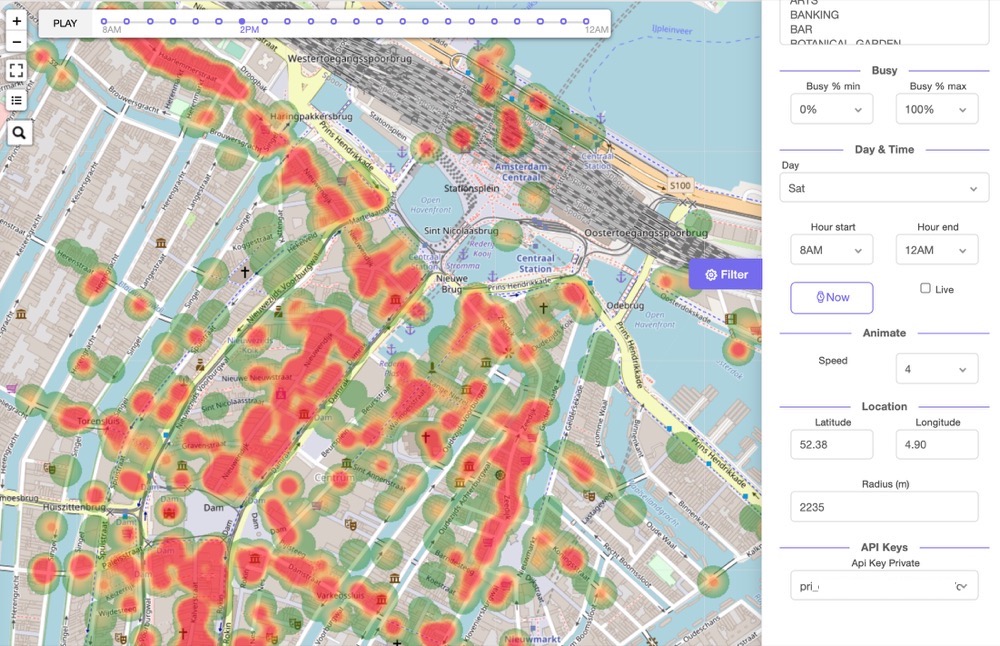
The BestTime Radar tool is using the same API endpoint to show all venues that meet the filter criteria on a (heat)map.
The endpoint will only return venues that have been forecasted before with the provided api_key_private. The user can manually add each desired venue individually through the BestTime API, or can use an external API service with public business (like Google Maps Places Nearby search, Here.com, Fouresquare Venues, or Factual Places). Using the external service places in a certain area can be discovered and the results (venue name and address) can be fed into the BestTime API.
To prevent manually adding all venues in a specific area (e.g. neighborhood or city) the 'Add Area' tool can be used (expected to be released in August 2020). Using this tool the user can define a geographical bounding box, select multiple desired types of venues (e.g. supermarkets, gyms, restaurants, etc). Under the hood it uses the Google Maps Nearby API to discover venues in the defined area (you will need a Google Maps API key). This geocoder has currently the biggest database and gives the best results.
Radar tool (which is using this 'venue filter' endpoint)
- api_key_private
stringREQUIRED
Private API Key. The endpoint will only return venues that are forecasted with this private API key. See more info on API keys
- collection_id
stringOPTIONAL
Filters on vennues within a collection. See more info on Collections - busy_min
intOPTIONAL
Minimum busyness for the filtered venues, ranging from0to100procent. Usebusy_confparameter to change the filter method.
- busy_max
intOPTIONAL
Maximum busyness for the filtered venues, ranging from0to100procent. Usebusy_confparameter to change the filter method.
- busy_conf
stringOPTIONAL
Selects howbusy_minandbusy_maxfilters on busyness percentage. Possible options areanyorall. Defaults toany.anywill return venues when at least one of the (selected) hours matches thebusy_minand/orbusy_maxfilter(s).allwill return venues when all (selected) hours match thebusy_minand/orbusy_maxfilter(s). Use thehour_minand/orhour_maxparameters to select specific hours were thebusy_minand/orbusy_maxfilters are applied on.
- hour_min
intOPTIONAL
Start hour, using the 24 hour notation. Ranging from0to24hour within the day window. See Forecast day window and weekdays. Cannot be used in combination with thenowandliveparameters set to betrue.
- hour_max
intOPTIONAL
Start hour, using the 24 hour notation. Ranging from0to24hour within the day window. See Forecast day window and weekdays. Cannot be used in combination with thenowandliveparameters set to betrue.
- day_int
intOPTIONAL
Day of the week. Range0(Monday) to6(Sunday). Will default to current day in local time of the first found venue that meets the filter. Cannot be used in combination with thenowandliveparameters set to betrue. - now
boolOPTIONAL
Sets the time and day filter to the current day and hour in local time. The local time of the first venue is taken that matches the filter criteria. Cannot be used in combination with thelive,day_int,hour_min, andhour_maxparameters.
- live
boolOPTIONAL
Sets the time and day filter to the current day and hour in local time, and will display the live busyness. Venues without live data will be filtered out. The local time of the first venue is taken that matches the filter criteria. Cannot be used in combination with thenow,day_int,hour_min, andhour_maxparameters.
- live_refresh
boolOPTIONAL New
Live refresh set totruewill refresh all live and forecast data for each individual venue meeting the filter. This will slow down the request and results in extra API credits per refreshed venue. - types
listOPTIONAL
Filters on one or more venue types. All types are selected if thetypesparameter is ommited. Possible types are['APPAREL', 'ARTS', 'BANKING', 'BAR', 'BOTANICAL_GARDEN', 'CAFE', 'CAR_RENTAL', 'CHURCH', 'CITY_HALL', 'COFFEE', 'DENTIST', 'DOCTOR', 'EMBASSY', 'EVENT_VENUE', 'FAST_FOOD', 'FOOD_AND_DRINK', 'FOOD_DELIVERY', 'GAS_STATION', 'GOVERNMENT', 'GROCERY', 'LODGING','MARKET', 'MOVIE_THEATER', 'MUSEUM', 'Other', 'PARK', 'PERFORMING_ARTS', 'PERSONAL_CARE', 'PHARMACY', 'PUBLIC_TRANSIT', 'RESTAURANT', 'SCHOOL', 'SHOPPING', 'SKILL_INSTRUCTION', 'SPA', 'SPORTS_COMPLEX', 'SUPERMARKET', 'TEA', 'TOURIST_DESTINATION', 'VISITOR_CENTER']
- lat
floatOPTIONAL
Geographic latitude of the search circle.latmust be combined withlng, andradius. The search circle cannot be combined with the bounding box parameters. Either a combination of alat,lng, with aradiusorlat_min,lng_min,lat_max, andlng_maxis required.
- lng
floatOPTIONAL
Geographic longitude of the search circle.lngmust be combined withlat, andradius. The search circle cannot be combined with the bounding box parameters. Either a combination of alat,lng, with aradiusorlat_min,lng_min,lat_max, andlng_maxis required.
- radius
intOPTIONAL
Radius of the search circle in meter.radiusmust be combined withlat, andlng. The search circle cannot be combined with the bounding box parameters. Either a combination of alat,lng, with aradiusorlat_min,lng_min,lat_max, andlng_maxis required.
- lat_min
floatOPTIONAL
Minimum latitude of the bounding box (South-West).lat_minmust be combined withlat_max,lng_minandlng_max. The bounding box cannot be combined with the circle parameters. Either a combination of alat,lng, with aradiusorlat_min,lng_min,lat_max, andlng_maxis required.
- lng_min
floatOPTIONAL
Minimum longitude of the bounding box (South-West).lng_minmust be combined withlng_max,lat_minandlat_max. The bounding box cannot be combined with the circle parameters. Either a combination of alat,lng, with aradiusorlat_min,lng_min,lat_max, andlng_maxis required.
- lat_max
floatOPTIONAL
Maximum latitude of the bounding box (North-East).lat_maxmust be combined withlat_min,lng_minandlng_max. The bounding box cannot be combined with the circle parameters. Either a combination of alat,lng, with aradiusorlat_min,lng_min,lat_max, andlng_maxis required.
- lng_max
floatOPTIONAL
Maximum longitude of the bounding box (North-East).lng_maxmust be combined withlng_min,lat_minandlat_max. The bounding box cannot be combined with the circle parameters. Either a combination of alat,lng, with aradiusorlat_min,lng_min,lat_max, andlng_maxis required.
- price_min
intOPTIONAL New
Minimum price level for a venue. Range1to5. Not all venues have a price level. Usingprice_minfilters out all venues without a price level.
- price_max
intOPTIONAL New
Maximum price level for a venue. Range1to5. Not all venues have a price level. Usingprice_maxfilters out all venues without a price level.
- rating_min
floatOPTIONAL New
Minimum rating for a venue. Possible values are2.0, 2.5, 3.0, 3.5, 4.0, 4.5.
- rating_max
floatOPTIONAL New
Maximum rating for a venue. Possible values are2.0, 3.0, 3.5, 4.0, 4.5, 5.0.
- reviews_min
intOPTIONAL New
Minimum amount of reviews for a venue. Minimum value0.
- reviews_max
intOPTIONAL New
Maximum amount of reviews for a venue. Minimum value0.
The above request returns a JSON response like this (this example only contains a list with one venue):
{
  "status": "OK",
  "venues": [
    {
      "day_int": 0,
      "day_raw": [
        0,
        20,
        80,
        80,
        20,
        0
      ],
      "venue_address": "61 Piccadilly Mayfair, London W1J 0DY United Kingdom",
      "venue_id": "ven_386d55494f76464873784752676b6445593949455752594a496843",
      "venue_lat": 51.5079836,
      "venue_lng": -0.1404946,
      "venue_name": "Caffe Concerto Green Park"
    },
    {
      "day_int": 0,
      "day_raw": [
        40,
        60,
        60,
        0,
        0,
        0
      ],
      "venue_address": "14 Riding House St Fitzrovia, London W1W 7HR United Kingdom",
      "venue_id": "ven_6372542d36476a4a59686d52676b646155646e713661514a496843",
      "venue_lat": 51.5183082,
      "venue_lng": -0.1415526,
      "venue_name": "The Great Thai Restaurant"
    }
  ]
}
Response attributes Query Venues
The JSON response will contain a list with venue objects.
- venues[N]
objectEach venue object contains venue information and busyness data.
- venues[N].day_int
int
Day integer range0(Monday) to6(Sunday)
- venues[N].day_raw
list
List of raw busyness data for each hour of the day, or within the selected hour range. The list contains percentages ranging from0to100. Indicating the busyness percentage. Percentages are based on historical visits for the given hour, relative to the biggest peak of the week for this venue. When thenoworliveparameter istruethe list will contain oneintfor the current hour in the local time.
- venues[N].venue_address
string
Address of the venue. This is the address of the venue as found by the geocoding lookup.
- venues[N].venue_lat
float
Geographic latitude of the venue.
- venues[N].venue_lng
float
Geographic longitude of the venue.
- venues[N].venue_id
string
Unique BestTime.app venue id.
- venues[N].venue_name
string
Name of the venue. This is the name of the venue as found by the geocoding lookup.
- venues[N].day_int
- status
stringStatus of the response. EitherOKorerror.
Query venue
Query a single venue:
import requests
import json

url = "https://beta.besttime.app/api/v1/venues/ven_51387131543761435650505241346a394a6432395362654a496843"

params = {
    'api_key_public': 'pub_e11661721b084d36b8f469a2c012e754'
}

response = requests.request("GET", url, params=params)

data = json.loads(response.text)

print(data)
# cURL
curl --location --request GET 'https://beta.besttime.app/api/v1/venues/ven_51387131543761435650505241346a394a6432395362654a496843&
api_key_public=pub_e11661721b084d36b8f469a2c012e754'
$.ajax({
"url": "https://beta.besttime.app/api/v1/venues/ven_51387131543761435650505241346a394a6432395362654a496843?api_key_public=pub_e11661721b084d36b8f469a2c012e754",
"method": "GET"
}).done(function (response) {
    console.log(response);
});
Input attributes Query Venue
The 'query venue' endpoint is used to retrieve information about the venue. It does not contain forecasted data, except the day rankings for a week. This query endpoint requires the private API key. Although the private API keys is used, this endpoint will be charged with query credits.
venue_id
stringREQUIRED
The unique ID for the venue. The venue_id can be retrieved from a 'new forecast' endpoint response, or by the 'all venues' endpoint which shows all previously forecasted venues.
api_key_private
stringREQUIRED
Private API Key. See more info on API keys
The above request returns a JSON response like this:
{
    "epoch_analysis": 1585875838,
    "forecast_updated_on": "Fri, 03 Apr 2020 01:03:58 GMT",
    "status": "OK",
    "venue_forecasted": true,
    "venue_info": {
        "venue_address": "1201 Ocean Ave San Francisco, CA 94112",
        "venue_current_gmttime": "Fri, 03 Apr 2020 03:03:51 GMT",
        "venue_current_localtime_iso": "2020-04-02T20:03:51.063663-07:00",
        "venue_id": "ven_51387131543761435650505241346a394a6432395362654a496843",
        "venue_lat": 37.7235448,
        "venue_lng": -122.455458,
        "venue_name": "McDonald's",
        "venue_timezone": "America/Los_Angeles"
    }
}
Response attributes Query Venue
The JSON response will contain detailed venue information.
- epoch_analysis
int
Epoch timestamp when the forecast was made.
- forecast_updated_on
TimeZone Aware DateTime string
Date and time (Time Zone aware) of the original forecast.
- status
string
Status of the response. EitherOKorError.
- venue_forecasted
bool
When a venue has been successfully forecasted the value will betrue. The value will befalseif the venue has been found by the geocoder, but the venue could not be forecasted.
- venue_info
object
Details of the forecasted venue.
- venue_info.venue_address
string
Address of the venue. This is the address of the venue as found by the geocoding lookup. Note this address could be different than thevenue_addressused as input. - venue_info.venue_current_gmtttime
string
Time at the venue in Greenwich Mean Time. Adjusting thehour_stepandday_stepwill also alter this time. - venue_info.venue_current_localtime_iso
string
Local time at the venue in ISO standard format. - venue_info.venue_id
string
Unique BestTime.app venue id. Thevenue_idis generated based on the venue name + address geocoding result. Therefore, when forecasting the same venue again it results in the same venue id. Thevenue_idis the primary input parameter to lookup (query) an existing forecast, using the query endpoints. Thevenue_idis used to perform queries. - venue_info.venue_lat
float
Geographic latitude of the venue. - venue_info.venue_lng
float
Geographic longitude of the venue. - venue_info.venue_name
string
Name of the venue. This is the name of the venue as found by the geocoding lookup. Note this name could be slightly different than thevenue_addressused as input.
- venue_info.venue_timezone
string
The timezone of the venue. E.g.America/Los Angeles
- venue_info.venue_address
Combine a new forecast with this query in a single API call
This query endpoint takes data from an earlier forecasted venue. You can also combine a fresh forecast and get the results from this query endpoint using:
- HTTP method:
POST(instead ofGET) - The same API query endpoint URL
https://beta.besttime.app/api/v1/venues -
venue_nameandvenue_addressas input orvenue_id - The input attributes from this query endpoint
See the New Forecast endpoint for more information on the venue_name and venue_address input. This will be counted as new forecast credits instead of a query credit.
Query all venues
Query list of all forecasted venues:
import requests
import json

url = "https://beta.besttime.app/api/v1/venues"

params = {
    'api_key_private': 'pri_50990bf1f8828f6abbf6152013113c6b'
}

response = requests.request("GET", url, params=params)

data = json.loads(response.text)

print(data)
# cURL
curl --location --request GET 'https://beta.besttime.app/api/v1/venues?
api_key_private=pri_50990bf1f8828f6abbf6152013113c6b'
$.ajax({
"url": "https://beta.besttime.app/api/v1/venues?api_key_private=pri_50990bf1f8828f6abbf6152013113c6b",
"method": "GET"
}).done(function (response) {
    console.log(response);
});
Input attributes Query All Venues
The 'query venues' endpoint is used to retrieve a list with all previously forecasted venues. This query endpoint requires the private API key. Although the private API keys is used, this endpoint will be charged with query credits.
- api_key_private
stringREQUIRED
Private API Key. See more info on API keys
The above request returns a JSON response like this (this example only contains a list with one venue):
[
    {
        "venue_address": "1201 Ocean Ave San Francisco, CA 94112 United States",
        "venue_forecasted": true,
        "venue_id": "ven_51387131543761435650505241346a394a6432395362654a496843",
        "venue_name": "McDonald's"
    }
]
Response attributes Query Venues
The JSON response will contain a list with venue objects.
- venue[N]
objectEach venue object contains detailed venue information.- venue[N].epoch_analysis
int
Epoch timestamp when the forecast was made.
- venue[N].venue_address
string
Address of the venue. This is the address of the venue as found by the geocoding lookup. Note this address could be different than thevenue_addressused as input.
- venue[N].venue_forecasted
Bool
When a venue has been successfully forecasted the value will betrue. The value will befalseif the venue has been found by the geocoder, but the venue could not be forecasted.
- venue[N].venue_id
string
Unique BestTime.app venue id. Thevenue_idis generated based on the venue name + address geocoding result. Therefore, when forecasting the same venue again it results in the same venue id. Thevenue_idis the primary input parameter to lookup (query) an existing forecast, using the query endpoints. Thevenue_idis used to perform queries. - venue[N].venue_name
string
Name of the venue. This is the name of the venue as found by the geocoding lookup. Note this name could be slightly different than thevenue_addressused as input.
- venue[N].epoch_analysis
Query week
Query the week (whole forecast):
import requests
import json

url = "https://beta.besttime.app/api/v1/forecasts/week"

params = {
    'api_key_public': 'pub_e11661721b084d36b8f469a2c012e754',
    'venue_id': 'ven_51387131543761435650505241346a394a6432395362654a496843',
}

response = requests.request("GET", url, params=params)

data = json.loads(response.text)

print(data)
# cURL
curl --location --request GET 'https://beta.besttime.app/api/v1/forecasts/week?api_key_public=pub_e11661721b084d36b8f469a2c012e754&venue_id=ven_51387131543761435650505241346a394a6432395362654a496843'
var params = {
    'api_key_public': 'pub_e11661721b084d36b8f469a2c012e754',
    'venue_id': 'ven_51387131543761435650505241346a394a6432395362654a496843'
}

$.ajax({
"url": "https://beta.besttime.app/api/v1/forecasts/week?" + new URLSearchParams(params),
"method": "GET"
}).done(function (response) {
    console.log(response);
});
The above request returns a JSON structured similar as the new forecast endpoint
Click here for the full JSON response
Input attributes
The 'query week' endpoint is used to retrieve all data from an existing forecast (every day of the week). The response structure is exactly the same as the new forecast response.
- venue_id
stringREQUIRED
The unique ID for the venue. The venue_id can be retrieved from a 'new forecast' endpoint response, or by the 'all venues' endpoint which shows all previously forecasted venues.
- api_key_public
stringREQUIRED
Public API Key. See more info on API keys
Response attributes
The response attributes are exactly the same as the attributes in the 'new forecast' endpoint.
See new forecast reponse attributes
Combine a new forecast with this query in a single API call
This query endpoint takes data from an earlier forecasted venue. You can also combine a fresh forecast and get the results from this query endpoint using:
- HTTP method:
POST(instead ofGET) - The same API query endpoint URL
https://beta.besttime.app/api/v1/forecasts/week -
venue_nameandvenue_addressas input orvenue_id - The input attributes from this query endpoint
See the New Forecast endpoint for more information on the venue_name and venue_address input. This will be counted as new forecast credits instead of a query credit.
Query week raw
Query the raw week data:
import requests
import json

url = "https://beta.besttime.app/api/v1/forecasts/week/raw"

params = {
    'api_key_public': 'pub_e11661721b084d36b8f469a2c012e754',
    'venue_id': 'ven_51387131543761435650505241346a394a6432395362654a496843',
}

response = requests.request("GET", url, params=params)

data = json.loads(response.text)

print(data)
# cURL
curl --location --request GET 'https://beta.besttime.app/api/v1/forecasts/week/raw?api_key_public=pub_e11661721b084d36b8f469a2c012e754&venue_id=ven_51387131543761435650505241346a394a6432395362654a496843'
var params = {
    'api_key_public': 'pub_e11661721b084d36b8f469a2c012e754',
    'venue_id': 'ven_51387131543761435650505241346a394a6432395362654a496843'
}

$.ajax({
"url": "https://beta.besttime.app/api/v1/forecasts/week/raw?" + new URLSearchParams(params),
"method": "GET"
}).done(function (response) {
    console.log(response);
});
Input attributes
The 'query week raw' endpoint is used to retrieve the raw data from an existing forecast (every day of the week).
- venue_id
stringREQUIRED
The unique ID for the venue. The venue_id can be retrieved from a 'new forecast' endpoint response, or by the 'all venues' endpoint which shows all previously forecasted venues.
- api_key_public
stringREQUIRED
Public API Key. See more info on API keys
The above request returns JSON structured like this:
{
    "analysis": {
        "week_raw": [
            0.0,
            10.0,
            30.0,
            60.0,
            80.0,
            90.0,
            100.0,
            Other hours hidden
            50.0,
            40.0,
            40.0,
            30.0,
            10.0,
            0.0,
            0.0
        ]
    },
    "epoch_analysis": 1585875838,
    "forecast_updated_on": "2020-04-03T01:03:58.692417+00:00",
    "venue_name": "McDonald's"
}
Alternative split per day data
Using the endpoint https://beta.besttime.app/api/v1/forecasts/week/raw2 will result in the same response but split per day using the day window from 6am till 5am next day.
{
    "analysis": {
        "week_raw": [
            {
                "day_int": 0,
                "day_raw": [
                    20,
                    30,
                    40,
                    50,
                    60,
                    ...
                    60,
                    50,
                    40,
                    30,
                    20,
                    0,
                    20,
                    20
                ]
            },
            ....
        ]
    },
    "status": "OK",
    "window": {
        "day_window_end_int": 6,
        "day_window_end_txt": "Monday",
        "day_window_start_int": 0,
        "day_window_start_txt": "Monday",
        "time_window_end": 5,
        "time_window_end_12h": "5AM",
        "time_window_start": 6,
        "time_window_start_12h": "6AM",
        "week_window": "Monday 6AM until Monday 5AM next week"
    }
}
Combine a new forecast with this query in a single API call
This query endpoint takes data from an earlier forecasted venue. You can also combine a fresh forecast and get the results from this query endpoint using:
- HTTP method:
POST(instead ofGET) - The same API query endpoint URL
https://beta.besttime.app/api/v1/forecasts/week/raw -
venue_nameandvenue_addressas input orvenue_id - The input attributes from this query endpoint
See the New Forecast endpoint for more information on the venue_name and venue_address input. This will be counted as new forecast credits instead of a query credit.
Query weekoverview
Query the week overview:
import requests
import json

url = "https://beta.besttime.app/api/v1/forecasts/weekoverview"

params = {
    'api_key_public': 'pub_e11661721b084d36b8f469a2c012e754',
    'venue_id': 'ven_51387131543761435650505241346a394a6432395362654a496843',
}

response = requests.request("GET", url, params=params)

data = json.loads(response.text)

print(data)
# cURL
curl --location --request GET 'https://beta.besttime.app/api/v1/forecasts/weekoverview?api_key_public=pub_e11661721b084d36b8f469a2c012e754&venue_id=ven_51387131543761435650505241346a394a6432395362654a496843'
var params = {
    'api_key_public': 'pub_e11661721b084d36b8f469a2c012e754',
    'venue_id': 'ven_51387131543761435650505241346a394a6432395362654a496843'
}

$.ajax({
"url": "https://beta.besttime.app/api/v1/forecasts/weekoverview?" + new URLSearchParams(params),
"method": "GET"
}).done(function (response) {
    console.log(response);
});
Input attributes
The 'query week' endpoint is used to retrieve all data from an existing forecast (every day of the week). The response structure is exactly the same as the new forecast response.
- venue_id
stringREQUIRED
The unique ID for the venue. The venue_id can be retrieved from a 'new forecast' endpoint response, or by the 'all venues' endpoint which shows all previously forecasted venues.
- api_key_public
stringREQUIRED
Public API Key. See more info on API keys
The above request returns a JSON response like this:
{
    "analysis": {
        "week_overview": [
            {
                "day_int": 0,
                "day_max": 100,
                "day_mean": 57,
                "day_rank_max": 1,
                "day_rank_mean": 6,
                "day_text": "Monday",
                "venue_closed": 4,
                "venue_open": 4
            },
            {
                "day_int": 1,
                "day_max": 96,
                "day_mean": 58,
                "day_rank_max": 3,
                "day_rank_mean": 5,
                "day_text": "Tuesday",
                "venue_closed": 4,
                "venue_open": 4
            },
            {
                "day_int": 2,
                "day_max": 99,
                "day_mean": 62,
                "day_rank_max": 2,
                "day_rank_mean": 1,
                "day_text": "Wednesday",
                "venue_closed": 4,
                "venue_open": 4
            },
            {
                "day_int": 3,
                "day_max": 87,
                "day_mean": 59,
                "day_rank_max": 6,
                "day_rank_mean": 4,
                "day_text": "Thursday",
                "venue_closed": 4,
                "venue_open": 4
            },
            {
                "day_int": 4,
                "day_max": 88,
                "day_mean": 61,
                "day_rank_max": 5,
                "day_rank_mean": 2,
                "day_text": "Friday",
                "venue_closed": 4,
                "venue_open": 4
            },
            {
                "day_int": 5,
                "day_max": 85,
                "day_mean": 60,
                "day_rank_max": 7,
                "day_rank_mean": 3,
                "day_text": "Saturday",
                "venue_closed": 4,
                "venue_open": 4
            },
            {
                "day_int": 6,
                "day_max": 93,
                "day_mean": 54,
                "day_rank_max": 4,
                "day_rank_mean": 7,
                "day_text": "Sunday",
                "venue_closed": 4,
                "venue_open": 4
            }
        ]
    },
    "forecast_updated_on": "2020-04-03T01:03:58.692417+00:00",
    "status": "OK"
}
Response attributes Weekoverview
- analysis
object
Containing the analysis.- analysis.week_overview
list
List with day objects, containing overview details per day.
- analysis.weekoverview[day].day_int
int
Day integer range0(Monday) to6(Sunday)
- analysis.weekoverview[day].day_max
int
Indicating the maximum busyness percentage. Values (0 - 100%) are based on the hour with the most visitors of the day, relative to the biggest peak of the week for this venue. - analysis.weekoverview[day].day_mean
int
Indicating the average busyness percentage (0 - 100%). Values are based on the total visitors (volume) of the day, relative to the biggest peak of the week for this venue. - analysis.weekoverview[day].day_rank_max
int
Day ranking based on the maximum busyness of the day. Range1to7. E.g.2indicates the 2nd most busy day of the week.
- analysis.weekoverview[day].day_rank_mean
int
Day ranking based on mean busyness (total volume) of the day. Range1to7. E.g.7indicates the least busy day of the week.
- analysis.weekoverview[day].day_text
string
Day name. E.g.monday
- analysis.weekoverview[day].venue_closed
int
Hour of day when the venue closes. Range0to23hour
- analysis.weekoverview[day].venue_open
int
Hour of day when the venue opens. Range0to23hour
- analysis.weekoverview[day].day_int
- analysis.week_overview
- forecast_updated_on
TimeZone Aware DateTime string
Date and time (Time Zone aware) of the original forecast.
- status
string
Status of the response. EitherOKorError.
### Combine a new forecast with this query in a single API call This query endpoint takes data from an earlier forecasted venue. You can also combine a fresh forecast and get the results from this query endpoint using:
- HTTP method:
POST(instead ofGET) - The same API query endpoint URL
https://beta.besttime.app/api/v1/forecasts/weekoverview -
venue_nameandvenue_addressas input orvenue_id - The input attributes from this query endpoint
See the New Forecast endpoint for more information on the venue_name and venue_address input. This will be counted as new forecast credits instead of a query credit.
Query day
Query one day of the week:
import requests
import json

url = "https://beta.besttime.app/api/v1/forecasts/day"

params = {
    'api_key_public': 'pub_e11661721b084d36b8f469a2c012e754',
    'venue_id': 'ven_51387131543761435650505241346a394a6432395362654a496843',
    'day_int': 3
}

response = requests.request("GET", url, params=params)

data = json.loads(response.text)

print(data)
# cURL
curl --location --request GET 'https://beta.besttime.app/api/v1/forecasts/day?api_key_public=pub_e11661721b084d36b8f469a2c012e754&venue_id=ven_51387131543761435650505241346a394a6432395362654a496843&
day_int=3'
var params = {
   'api_key_public': 'pub_e11661721b084d36b8f469a2c012e754',
    'venue_id': 'ven_51387131543761435650505241346a394a6432395362654a496843',
    'day_int': 3
}

$.ajax({
"url": "https://beta.besttime.app/api/v1/forecasts/day?" + new URLSearchParams(params),
"method": "GET"
}).done(function (response) {
    console.log(response);
});
Input attributes Query Day
The 'query day' endpoint is used to retrieve all analysis from an existing forecast for a specific day of the week.
- venue_id
stringREQUIRED
The unique ID for the venue. The venue_id can be retrieved from a 'new forecast' endpoint response, or by the 'all venues' endpoint which shows all previously forecasted venues.
- day_int
intREQUIRED
Day of the week. Range0(Monday) to6(Sunday).
- api_key_public
stringREQUIRED
Public API Key. See more info on API keys
The above request returns a JSON response like this:
  {
  "analysis": {
    "busy_hours": [
      9,
      10,
      11
    ],
    "day_info": {
      "day_int": 0,
      "day_rank_max": 6,
      "day_rank_mean": 4,
      "day_text": "Monday",
      "venue_closed": 4,
      "venue_open": 4
    },
    "hour_analysis": [{
        "hour": 6,
        "intensity_nr": -1,
        "intensity_txt": "Below average"
      },
      {
        "hour": 7,
        "intensity_nr": -1,
        "intensity_txt": "Below average"
      },
      {
        "hour": 8,
        "intensity_nr": 0,
        "intensity_txt": "Average"
      },
      ....Other hours hidden. See below for the full JSON response example...
      {
        "hour": 5,
        "intensity_nr": -1,
        "intensity_txt": "Below average"
      }
    ],
    "peak_hours": [{
      "peak_delta_mean_week": 29,
      "peak_end": 23,
      "peak_intensity": 4,
      "peak_max": 11,
      "peak_start": 8
    }],
    "quiet_hours": [
      2,
      3,
      4,
      5
    ],
    "surge_hours": {
      "most_people_come": 8,
      "most_people_leave": 0
    }
  },
  "day_int": 0,
  "epoch_analysis": 1583400856,
  "forecast_updated_on": "2020-03-05T09:34:16.836061+00:00",
  "status": "OK",
  "venue_id": "ven_51387131543761435650505241346a394a6432395362654a496843",
  "venue_name": "McDonald's"
}
Click here for the full JSON response
Response attributes Query Day
- analysis
object
Containing the all the included analytics like 'peak_hours', 'busy_hours', etc for the given day.- analysis.busy_hours
list
List with busy hours of the day. The hours are in 24 hourintnotation.
- analysis.day_info
object
Details about the day
- analysis.day_info.day_int
int
Day integer range0(Monday) to6(Sunday)
- analysis.day_info.day_rank_max
int
Day ranking based on the maximum busyness of the day. Range1to7. E.g.2indicates the 2nd most busy day of the week.
- analysis.day_info.day_rank_mean
int
Day ranking based on mean busyness (total volume) of the day. Range1to7. E.g.7indicates the least busy day of the week.
- analysis.day_info.day_text
string
Day name. E.g.monday
- analysis.day_info.venue_closed
int
Hour of day when the venue closes. Range0to23hour
- analysis.day_info.venue_open
int
Hour of day when the venue opens. Range0to23hour
- analysis.day_info.day_int
- analysis.hour_analysis
list
List with hour objects, containing details per hour.
- analysis.hour_analysis.hour
int
Hour integer range0(midnight) to23(11pm). Please note that the hour window within a weekday starts at 6AMhour = 6and ends at 5AMhour = 5. See Introduction section Forecast day window and weekdays
- analysis.hour_analysis.intensity_nr
int
Hour intensity_nr indicates how busy the venue is on a scale of 5, ranging from-2to2. When the venue is closed at the given hour it indicates999. Seeintensity_txtfor the textual version of the same scale.
- analysis.hour_analysis.intensity_txt
string
Hour intensity_txt indicates how busy the venue is on a scale of 5. Seeintensity_nrfor the integer version of the same scale. The intensity is eitherLow,Below average,Average,Above average, orHigh. When the venue is closed at the given hour it indicatesClosed.
- analysis.hour_analysis.hour
- analysis.peak_hours
list
List with peak objects, containing details of one or multiple peaks per day.
- analysis.peak_hours.peak_start
int
Start hour of the peak, using the 24 hour notation.
- analysis.peak_hours.peak_max
int
Hour of the day when the peak is at its maximum. Using the 24 hour notation.
- analysis.peak_hours.peak_end
int
End hour of the peak, using the 24 hour notation.
- analysis.peak_hours.peak_intensity
int
Intensity of the peak, rated from1(minimum) to5(maximum)
- analysis.peak_hours.peak_delta_mean_week
int
Percentage how much the peak maximum is above the mean busyness of the week.
- analysis.peak_hours.peak_start
- analysis.quiet_hours
list
List with quiet hours of the day. The hours are in 24 hourintnotation.
- analysis.surge_hours
object
Details at which hour most people enter (come) or leave the venue.- analysis.surge_hours.most_people_come
int
Hour when most people come to the venue during the day window. The hours are in 24 hourintnotation.
- analysis.surge_hours.most_people_leave
int
Hour when most people leave to the venue during the day window. The hours are in 24 hourintnotation.
- analysis.surge_hours.most_people_come
- analysis.busy_hours
- epoch_analysis
int
Epoch timestamp when the forecast was made.
- forecast_updated_on
TimeZone Aware DateTime string
Date and time (Time Zone aware) of the original forecast.
- status
string
Status of the response. EitherOKorError.
- venue_info
object
Details of the forecasted venue.
- venue_info.venue_name
string
Name of the venue. This is the name of the venue as found by the geocoding lookup. Note this name could be slightly different than thevenue_addressused as input.
- venue_info.venue_address
string
Address of the venue. This is the address of the venue as found by the geocoding lookup. Note this address could be different than thevenue_addressused as input.
- venue_info.venue_id
string
Unique BestTime.app venue id. Thevenue_idis generated based on the venue name + address geocoding result. Therefore, when forecasting the same venue again it results in the same venue id. Thevenue_idis the primary input parameter to lookup (query) an existing forecast, using the query endpoints. Thevenue_idis used to perform queries. - venue_info.venue_timezone
string
The timezone of the venue. E.g.America/Los Angeles
- venue_info.venue_name
Combine a new forecast with this query in a single API call
This query endpoint takes data from an earlier forecasted venue. You can also combine a fresh forecast and get the results from this query endpoint using:
- HTTP method:
POST(instead ofGET) - The same API query endpoint URL
https://beta.besttime.app/api/v1/forecasts/day -
venue_nameandvenue_addressas input orvenue_id - The input attributes from this query endpoint
See the New Forecast endpoint for more information on the venue_name and venue_address input. This will be counted as new forecast credits instead of a query credit.
Query day raw
Query the raw day data:
import requests
import json

url = "https://beta.besttime.app/api/v1/forecasts/day/raw"

params = {
    'api_key_public': 'pub_e11661721b084d36b8f469a2c012e754',
    'venue_id': 'ven_51387131543761435650505241346a394a6432395362654a496843',
    'day_int': 3
}

response = requests.request("GET", url, params=params)

data = json.loads(response.text)

print(data)
# cURL
curl --location --request GET 'https://beta.besttime.app/api/v1/forecasts/day/raw?api_key_public=pub_e11661721b084d36b8f469a2c012e754&venue_id=ven_51387131543761435650505241346a394a6432395362654a496843&
day_int=3'
var params = {
   'api_key_public': 'pub_e11661721b084d36b8f469a2c012e754',
    'venue_id': 'ven_51387131543761435650505241346a394a6432395362654a496843',
    'day_int': 3
}

$.ajax({
"url": "https://beta.besttime.app/api/v1/forecasts/day/raw?" + new URLSearchParams(params),
"method": "GET"
}).done(function (response) {
    console.log(response);
});
Input attributes
The 'query day raw' endpoint is used to retrieve the raw data from an existing forecast for one day of the week.
- venue_id
stringREQUIRED
The unique ID for the venue. The venue_id can be retrieved from a 'new forecast' endpoint response, or by the 'all venues' endpoint which shows all previously forecasted venues.
- day_int
intREQUIRED
Day of the week. Range0(Monday) to6(Sunday).
- api_key_public
stringREQUIRED
Public API Key. See more info on API keys
The above request returns JSON structured like this:
{
    "analysis": {
        "day_raw": [
            0.0,
            40.0,
            60.0,
            70.0,
            80.0,
            90.0,
            90.0,
            90.0,
            90.0,
            80.0,
            70.0,
            70.0,
            70.0,
            70.0,
            70.0,
            70.0,
            60.0,
            50.0,
            40.0,
            30.0,
            20.0,
            10.0,
            0.0,
            0.0
        ]
    },
    "epoch_analysis": 1585875838,
    "forecast_updated_on": "2020-04-03T01:03:58.685394+00:00",
    "status": "OK"
}
Combine a new forecast with this query in a single API call
This query endpoint takes data from an earlier forecasted venue. You can also combine a fresh forecast and get the results from this query endpoint using:
- HTTP method:
POST(instead ofGET) - The same API query endpoint URL
https://beta.besttime.app/api/v1/forecasts/day/raw -
venue_nameandvenue_addressas input orvenue_id - The input attributes from this query endpoint
See the New Forecast endpoint for more information on the venue_name and venue_address input. This will be counted as new forecast credits instead of a query credit.
Query hour
Query a specific hour of the week:
import requests
import json

url = "https://beta.besttime.app/api/v1/forecasts/hour"

params = {
    'api_key_public': 'pub_e11661721b084d36b8f469a2c012e754',
    'venue_id': 'ven_51387131543761435650505241346a394a6432395362654a496843',
    'day_int': 3,
    'hour':23
}

response = requests.request("GET", url, params=params)

data = json.loads(response.text)

print(data)
# cURL
curl --location --request GET 'https://beta.besttime.app/api/v1/forecasts/hour?api_key_public=pub_e11661721b084d36b8f469a2c012e754&venue_id=ven_51387131543761435650505241346a394a6432395362654a496843&
day_int=3&
hour=23'
var params = {
      'api_key_public': 'pub_e11661721b084d36b8f469a2c012e754',
      'venue_id': 'ven_51387131543761435650505241346a394a6432395362654a496843',
      'day_int': 3,
      'hour': 23
}

$.ajax({
"url": "https://beta.besttime.app/api/v1/forecasts/hour?" + new URLSearchParams(params),
"method": "GET"
}).done(function (response) {
    console.log(response);
});
Input attributes Query Hour
The 'query hour' endpoint is used to retrieve the 'hour analysis' forecast for the given hour and day of the week.
- venue_id
stringREQUIRED
The unique ID for the venue. The venue_id can be retrieved from a 'new forecast' endpoint response, or by the 'all venues' endpoint which shows all previously forecasted venues.
- day_int
intREQUIRED
Day of the week. Range0(Monday) to6(Sunday).
- hour
intREQUIRED
Hour of the day. Range0(Midnight) to23(11pm). Please note that the day window within a weekday starts at 6AMhour = 6and ends at 5AMhour = 5next day. See Introduction section Forecast day window and weekdays
- api_key_public
stringREQUIRED
Public API Key. See more info on API keys
The above request returns a JSON reponse like this:
{
    "analysis": {
        "hour_analysis": {
            "hour": 23,
            "intensity_nr": 0,
            "intensity_txt": "Average"
        }
    },
    "day_int": 3,
    "epoch_analysis": 1583400856,
    "forecast_updated_on": "2020-03-05T09:34:16.842662+00:00",
    "status": "OK",
    "venue_info": {
        "venue_id": "ven_51387131543761435650505241346a394a6432395362654a496843",
        "venue_name": "McDonald's"
    }
}
Click here for the raw JSON response.
Response attributes Query Hour
- analysis
object
Containing the all the included analytics like 'peak_hours', 'busy_hours', etc for the given day.- analysis.hour_analysis
list
List with hour objects, containing details per hour.
- analysis.hour_analysis.hour
int
Hour integer range0(midnight) to23(11pm). Please note that the hour window within a weekday starts at 6AMhour = 6and ends at 5AMhour = 5. See Introduction section Forecast day window and weekdays
- analysis.hour_analysis.intensity_nr
int
Hour intensity_nr indicates how busy the venue is on a scale of 5, ranging from-2to2. When the venue is closed at the given hour it indicates999. Seeintensity_txtfor the textual version of the same scale.
- analysis.hour_analysis.intensity_txt
string
Hour intensity_txt indicates how busy the venue is on a scale of 5. Seeintensity_nrfor the integer version of the same scale. The intensity is eitherLow,Below average,Average,Above average, orHigh. When the venue is closed at the given hour it indicatesClosed.
- analysis.hour_analysis
- day_int
int
Day integer range0(Monday) to6(Sunday)
- epoch_analysis
int
Epoch timestamp when the forecast was made.
- forecast_updated_on
TimeZone Aware DateTime string
Date and time (Time Zone aware) of the original forecast.
- status
string
Status of the response. EitherOKorError.
- venue_info
object
Details of the forecasted venue.
- venue_info.venue_id
string
Unique BestTime.app venue id. Thevenue_idis generated based on the venue name + address geocoding result. Therefore, when forecasting the same venue again it results in the same venue id. Thevenue_idis primary input parameter to lookup (query) an existing forecast, using the query endpoints. Thevenue_idis used to perform queries.
- venue_info.venue_name
string
Name of the venue. This is the name of the venue as found by the geocoding lookup. Note this name could be slightly different than thevenue_addressused as input.
- venue_info.venue_id
Combine a new forecast with this query in a single API call
This query endpoint takes data from an earlier forecasted venue. You can also combine a fresh forecast and get the results from this query endpoint using:
- HTTP method:
POST(instead ofGET) - The same API query endpoint URL
https://beta.besttime.app/api/v1/forecasts/hour -
venue_nameandvenue_addressas input orvenue_id - The input attributes from this query endpoint
See the New Forecast endpoint for more information on the venue_name and venue_address input. This will be counted as new forecast credits instead of a query credit.
Query hour raw
Query the raw hour data:
import requests
import json

url = "https://beta.besttime.app/api/v1/forecasts/hour/raw"

params = {
    'api_key_public': 'pub_e11661721b084d36b8f469a2c012e754',
    'venue_id': 'ven_51387131543761435650505241346a394a6432395362654a496843',
    'day_int': 3,
    'hour': 16
}

response = requests.request("GET", url, params=params)

data = json.loads(response.text)

print(data)
# cURL
curl --location --request GET 'https://beta.besttime.app/api/v1/forecasts/hour/raw?api_key_public=pub_e11661721b084d36b8f469a2c012e754&venue_id=ven_51387131543761435650505241346a394a6432395362654a496843&day_int=3&hour=16'
var params = {
    'api_key_public': 'pub_e11661721b084d36b8f469a2c012e754',
    'venue_id': 'ven_51387131543761435650505241346a394a6432395362654a496843',
    'day_int':3,
    'hour':16
}

$.ajax({
"url": "https://beta.besttime.app/api/v1/forecasts/hour/raw?" + new URLSearchParams(params),
"method": "GET"
}).done(function (response) {
    console.log(response);
});
Input attributes
The 'query hour raw' endpoint is used to retrieve the raw data from an existing forecast for one hour of the day.
- venue_id
stringREQUIRED
The unique ID for the venue. The venue_id can be retrieved from a 'new forecast' endpoint response, or by the 'all venues' endpoint which shows all previously forecasted venues.
- day_int
intREQUIRED
Day of the week. Range0(Monday) to6(Sunday).
- hour
intREQUIRED
Hour of the day. Range0(Midnight) to23(11pm). Please note that the day window within a weekday starts at 6AMhour = 6and ends at 5AMhour = 5next day. See Introduction section Forecast day window and weekdays
- api_key_public
stringREQUIRED
Public API Key. See more info on API keys
The above request returns JSON structured like this:
{
  "analysis": {
    "hour_analysis": {
      "hour": 16,
      "intensity_nr": 0,
      "intensity_txt": "Average"
    },
    "hour_raw": 70
  },
  "epoch_analysis": 1585890444,
  "forecast_updated_on": "2020-04-03T05:07:26.012357+00:00",
  "status": "OK",
  "venue_info": {
    "venue_id": "ven_51387131543761435650505241346a394a6432395362654a496843",
    "venue_name": "McDonald's"
  }
}
Combine a new forecast with this query in a single API call
This query endpoint takes data from an earlier forecasted venue. You can also combine a fresh forecast and get the results from this query endpoint using:
- HTTP method:
POST(instead ofGET) - The same API query endpoint URL
https://beta.besttime.app/api/v1/forecasts/hour/raw -
venue_nameandvenue_addressas input orvenue_id - The input attributes from this query endpoint
See the New Forecast endpoint for more information on the venue_name and venue_address input. This will be counted as new forecast credits instead of a query credit.
Query now
Query the now:
import requests
import json

url = "https://beta.besttime.app/api/v1/forecasts/now"

params = {
    'api_key_public': 'pub_e11661721b084d36b8f469a2c012e754',
    'venue_id': 'ven_51387131543761435650505241346a394a6432395362654a496843'
}

response = requests.request("GET", url, params=params)

data = json.loads(response.text)

print(data)
# cURL
curl --location --request GET 'https://beta.besttime.app/api/v1/forecasts/now?api_key_public=pub_e11661721b084d36b8f469a2c012e754&venue_id=ven_51387131543761435650505241346a394a6432395362654a496843'
var params = {
    'api_key_public': 'pub_e11661721b084d36b8f469a2c012e754',
    'venue_id': 'ven_51387131543761435650505241346a394a6432395362654a496843'
}

$.ajax({
"url": "https://beta.besttime.app/api/v1/forecasts/now?" + new URLSearchParams(params),
"method": "GET"
}).done(function (response) {
    console.log(response);
});
Input attributes Query Now
The 'query now' endpoint is used to retrieve the 'hour analysis' forecast for the current hour. The hour is the venues current hour with the local timezone taken into account.
- venue_id
stringREQUIRED
The unique ID for the venue. The venue_id can be retrieved from a 'new forecast' endpoint response, or by the 'all venues' endpoint which shows all previously forecasted venues.
- api_key_public
stringREQUIRED
Public API Key. See more info on API keys
- hour_step
intOPTIONAL
Adjust the hour (hour of the venue in the local timezone). E.g.0means current hour, and-2means two hours ago. Range: min-12, max12.
The above request returns a JSON response like this:
{
    "analysis": {
        "hour_analysis": {
            "hour": 23,
            "intensity_nr": 0,
            "intensity_txt": "Average"
        }
    },
    "day_int": 3,
    "epoch_analysis": 1583400856,
    "forecast_updated_on": "2020-03-05T09:34:16.842662+00:00",
    "status": "OK",
    "venue_info": {
        "venue_id": "ven_51387131543761435650505241346a394a6432395362654a496843",
        "venue_name": "McDonald's"
    }
}
Click here for the raw JSON response.
Response attributes Query Current Hour
The response attributes are the same as the attributes in the 'query hour' endpoint. See query hour response attributes.
Combine a new forecast with this query in a single API call
This query endpoint takes data from an earlier forecasted venue. You can also combine a fresh forecast and get the results from this query endpoint using:
- HTTP method:
POST(instead ofGET) - The same API query endpoint URL
https://beta.besttime.app/api/v1/forecasts/now -
venue_nameandvenue_addressas input orvenue_id - The input attributes from this query endpoint
See the New Forecast endpoint for more information on the venue_name and venue_address input. This will be counted as new forecast credits instead of a query credit.
Query now raw
Query the raw hour data for current hour:
import requests
import json

url = "https://beta.besttime.app/api/v1/forecasts/now/raw"

params = {
    'api_key_public': 'pub_e11661721b084d36b8f469a2c012e754',
    'venue_id': 'ven_51387131543761435650505241346a394a6432395362654a496843'
}

response = requests.request("GET", url, params=params)

data = json.loads(response.text)

print(data)
# cURL
curl --location --request GET 'https://beta.besttime.app/api/v1/forecasts/now/raw?api_key_public=pub_e11661721b084d36b8f469a2c012e754&venue_id=ven_51387131543761435650505241346a394a6432395362654a496843'
var params = {
    'api_key_public': 'pub_e11661721b084d36b8f469a2c012e754',
    'venue_id': 'ven_51387131543761435650505241346a394a6432395362654a496843'
}

$.ajax({
"url": "https://beta.besttime.app/api/v1/forecasts/now/raw?" + new URLSearchParams(params),
"method": "GET"
}).done(function (response) {
    console.log(response);
});
Input attributes
The 'query now raw' endpoint is used to retrieve the raw data from an existing forecast for one hour of the day. It automatically determines the current day and hour in the local timezone of the venue.
- venue_id
stringREQUIRED
The unique ID for the venue. The venue_id can be retrieved from a 'new forecast' endpoint response, or by the 'all venues' endpoint which shows all previously forecasted venues.
- day_int
intREQUIRED
Day of the week. Range0(Monday) to6(Sunday).
The above request returns JSON structured like this:
{
  "analysis": {
    "hour_analysis": {
      "hour": 16,
      "intensity_nr": 0,
      "intensity_txt": "Average"
    },
    "hour_raw": 70
  },
  "epoch_analysis": 1585890444,
  "forecast_updated_on": "2020-04-03T05:07:26.012357+00:00",
  "status": "OK",
  "venue_info": {
    "venue_id": "ven_51387131543761435650505241346a394a6432395362654a496843",
    "venue_name": "McDonald's"
  }
}
Combine a new forecast with this query in a single API call
This query endpoint takes data from an earlier forecasted venue. You can also combine a fresh forecast and get the results from this query endpoint using:
- HTTP method:
POST(instead ofGET) - The same API query endpoint URL
https://beta.besttime.app/api/v1/forecasts/now/raw -
venue_nameandvenue_addressas input orvenue_id - The input attributes from this query endpoint
See the New Forecast endpoint for more information on the venue_name and venue_address input. This will be counted as new forecast credits instead of a query credit.
Query peak hours
Query peaks:
import requests
import json

url = "https://beta.besttime.app/api/v1/forecasts/peaks"

params = {
    'api_key_public': 'pub_e11661721b084d36b8f469a2c012e754',
    'venue_id': 'ven_51387131543761435650505241346a394a6432395362654a496843',
    'day_step': 0,
    'hour_step': 0
}

response = requests.request("GET", url, params=params)

data = json.loads(response.text)

print(data)
# cURL
curl --location --request GET 'https://beta.besttime.app/api/v1/forecasts/peaks?api_key_public=pub_e11661721b084d36b8f469a2c012e754&venue_id=ven_51387131543761435650505241346a394a6432395362654a496843&
day_step=0&
hour_step=0'
var params = {
    'api_key_public': 'pub_e11661721b084d36b8f469a2c012e754',
    'venue_id': 'ven_51387131543761435650505241346a394a6432395362654a496843',
    'day_step': 0,
    'hour_step': 0
}

$.ajax({
"url": "https://beta.besttime.app/api/v1/forecasts/peaks?" + new URLSearchParams(params),
"method": "GET"
}).done(function (response) {
    console.log(response);
});
Input attributes Query Peaks
The 'query peaks' endpoint is used to retrieve all peaks from an existing forecast for a specific day of the week.
By default, the response includes the peak objects for the current day (at the local timezone of the venue) peak_hours. Additionally, it contains a list with peak objects peaks_coming which only contains the peaks from peak_hours which have not passed yet.
- venue_id
stringREQUIRED
The unique ID for the venue. The venue_id can be retrieved from a 'new forecast' endpoint response, or by the 'all venues' endpoint which shows all previously forecasted venues.
- day_int
intOPTIONAL
Day of the week. Range0(Monday) to6(Sunday).day_intcannot be used in combination withday_stepandhour_step.
- day_int
- day_step
intOPTIONAL
Adjust the day (day of week of the venue in the local timezone). E.g.0means current day, and1means tomorrow. Range: min-31, max31.day_stepcannot be used in combination withday_int.
- hour_step
intOPTIONAL
Adjust the hour (hour of the venue in the local timezone). E.g.0means current hour, and-2means two hours ago. Range: min-12, max12.hour_stepcannot be used in combination withday_int.
- api_key_public
stringREQUIRED
Public API Key. See more info on API keys
The above request returns a JSON response like this:
{
    "analysis": {
        "day_info": {
            "day_int": 1,
            "day_rank_max": 2,
            "day_rank_mean": 4,
            "day_text": "Tuesday",
            "venue_closed": 4,
            "venue_open": 4
        },
        "peak_hours": [
            {
                "peak_delta_mean_week": 37,
                "peak_end": 18,
                "peak_end_12h": "6PM",
                "peak_end_in": "2 hour and 40 minutes",
                "peak_end_in_sec": 9660,
                "peak_end_passed": 0,
                "peak_intensity": 5,
                "peak_max": 13,
                "peak_max_12h": "1PM",
                "peak_max_in": "Peak maximum already passed",
                "peak_max_in_sec": 0,
                "peak_max_passed": 1,
                "peak_start": 7,
                "peak_start_12h": "7AM",
                "peak_start_in": "Peak already started",
                "peak_start_passed": 1
            },
            {
                "peak_delta_mean_week": 12,
                "peak_end": 23,
                "peak_end_12h": "11PM",
                "peak_end_in": "7 hour and 41 minutes",
                "peak_end_in_sec": 27660,
                "peak_end_passed": 0,
                "peak_intensity": 3,
                "peak_max": 21,
                "peak_max_12h": "9PM",
                "peak_max_in": "5 hour and 41 minutes",
                "peak_max_in_sec": 20460,
                "peak_max_passed": 0,
                "peak_start": 18,
                "peak_start_12h": "6PM",
                "peak_start_in": "2 hour and 40 minutes",
                "peak_start_in_sec": 9660,
                "peak_start_passed": 0
            }
        ]
    },
    "epoch_analysis": 1583400856,
    "forecast_updated_on": "2020-03-05T09:34:16.842016+00:00",
    "status": "OK",
    "venue_info": {
        "venue_current_gmttime": "Tue, 10 Mar 2020 22:19:56 GMT",
        "venue_current_localtime_iso": "2020-03-10T15:19:56.979659-07:00",
        "venue_id": "ven_51387131543761435650505241346a394a6432395362654a496843",
        "venue_name": "McDonald's",
        "venue_timezone": "America/Los_Angeles"
    }
}
Response attributes Query Peaks
- analysis
object
Containing the all the peak analysis and venue day info.- analysis.day_info
object
Details about the day
- analysis.day_info.day_int
int
Day integer range0(Monday) to6(Sunday)
- analysis.day_info.day_rank_max
int
Day ranking based on the maximum busyness of the day. Range1to7. E.g.2indicates the 2nd most busy day of the week.
- analysis.day_info.day_rank_mean
int
Day ranking based on mean busyness (total volume) of the day. Range1to7. E.g.7indicates the least busy day of the week.
- analysis.day_info.day_text
string
Day name. E.g.monday
- analysis.day_info.venue_closed
int
Hour of day when the venue closes. Range0to23hour
- analysis.day_info.venue_open
int
Hour of day when the venue opens. Range0to23hour
- analysis.day_info.day_int
- analysis.peak_hours
list
List with peak objects, containing details of one or multiple peaks per day.
- analysis.peak_hours.peak_start
int
Start hour of the peak, using the 24 hour notation.
- analysis.peak_hours.peak_start_passed
int
Indicates if the peak start is already passed. Indicates1for passed,0for not passed. - analysis.peak_hours.peak_start_12
string
Start hour of the peak, using the 12 hour notation.
- analysis.peak_hours.peak_start_in
string
Time remaining until the peak starts. Notation 'HH hour and MM minutes'. If peak start has been passed it will indicatePeak start already passed
- analysis.peak_hours.peak_start_in_sec
int
Time remaining until the peak starts, in seconds.
- analysis.peak_hours.peak_max
int
Hour of the day when the peak is at its maximum. Using the 24 hour notation.
- analysis.peak_hours.peak_max_passed
int
Indicates if the peak max is already passed. Indicates1for passed,0for not passed.
- analysis.peak_hours.peak_max_12
string
Hour of the day when the peak is at its maximum. Using the 12 hour notation.
- analysis.peak_hours.peak_max_in
string
Time remaining until the peak is at its maximum. Notation 'HH hour and MM minutes'. If peak start has been passed it will indicatePeak maximum already passed
- analysis.peak_hours.peak_max_in_sec
int
Time remaining until the peak is at its maximum, in seconds - analysis.peak_hours.peak_end
int
End hour of the peak, using the 24 hour notation.
- analysis.peak_hours.peak_end_passed
int
Indicates if the peak end is already passed. Indicates1for passed,0for not passed.
- analysis.peak_hours.peak_end_12
string
End hour of the peak, using the 12 hour notation.
- analysis.peak_hours.peak_end_in
string
Time remaining until the peak ends. Notation 'HH hour and MM minutes'. If peak start has been passed it will indicatePeak end already passed
- analysis.peak_hours.peak_end_in_sec
int
Time remaining until the peak ends, in seconds.
- analysis.peak_hours.peak_intensity
int
Intensity of the peak, rated from1(minimum) to5(maximum)
- analysis.peak_hours.peak_delta_mean_week
int
Percentage how much the peak maximum is above the mean busyness of the week.
- analysis.peak_hours.peak_start
- analysis.day_info
- epoch_analysis
int
Epoch timestamp when the forecast was made.
- forecast_updated_on
TimeZone Aware DateTime string
Date and time (Time Zone aware) of the original forecast.
- status
string
Status of the response. EitherOKorError.
- venue_info
object
Details of the forecasted venue.
- venue_info.venue_name
string
Name of the venue. This is the name of the venue as found by the geocoding lookup. Note this name could be slightly different than thevenue_addressused as input.
- venue_info.venue_address
string
Address of the venue. This is the address of the venue as found by the geocoding lookup. Note this address could be different than thevenue_addressused as input.
- venue_info.venue_current_gmtttime
string
Time at the venue in Greenwich Mean Time. Adjusting thehour_stepandday_stepwill also alter this time. - venue_info.venue_current_localtime_iso
string
Local time at the venue in ISO standard format. Adjusting thehour_stepandday_stepwill also alter this time.
- venue_info.venue_id
string
Unique BestTime.app venue id. Thevenue_idis generated based on the venue name + address geocoding result. Therefore, when forecasting the same venue again it results in the same venue id. Thevenue_idis the primary input parameter to lookup (query) an existing forecast, using the query endpoints. Thevenue_idis used to perform queries. - venue_info.venue_timezone
string
The timezone of the venue. E.g.America/Los Angeles
- venue_info.venue_name
Combine a new forecast with this query in a single API call
This query endpoint takes data from an earlier forecasted venue. You can also combine a fresh forecast and get the results from this query endpoint using:
- HTTP method:
POST(instead ofGET) - The same API query endpoint URL
https://beta.besttime.app/api/v1/forecasts/peaks -
venue_nameandvenue_addressas input orvenue_id - The input attributes from this query endpoint
See the New Forecast endpoint for more information on the venue_name and venue_address input. This will be counted as new forecast credits instead of a query credit.
Query busy hours
Query busy hours:
import requests
import json

url = "https://beta.besttime.app/api/v1/forecasts/busy"

params = {
    'api_key_public': 'pub_e11661721b084d36b8f469a2c012e754',
    'venue_id': 'ven_51387131543761435650505241346a394a6432395362654a496843',
    'day_step': 0
}

response = requests.request("GET", url, params=params)

data = json.loads(response.text)

print(data)
# cURL
curl --location --request GET 'https://beta.besttime.app/api/v1/forecasts/busy?api_key_public=pub_e11661721b084d36b8f469a2c012e754&venue_id=ven_51387131543761435650505241346a394a6432395362654a496843&
day_step=0'
var params = {
    'api_key_public': 'pub_e11661721b084d36b8f469a2c012e754',
    'venue_id': 'ven_51387131543761435650505241346a394a6432395362654a496843',
    'day_step': 0
}

$.ajax({
"url": "https://beta.besttime.app/api/v1/forecasts/busy?" + new URLSearchParams(params),
"method": "GET"
}).done(function (response) {
    console.log(response);
});
Input attributes Query Busy hours
The 'query busy hours' endpoint is used to retrieve all busy hour information from an existing forecast for a specific day of the week. By default, the response includes the busy hour information for the current day (at the local timezone of the venue).
- venue_id
stringREQUIRED
The unique ID for the venue. The venue_id can be retrieved from a 'new forecast' endpoint response, or by the 'all venues' endpoint which shows all previously forecasted venues.
- day_int
intOPTIONAL
Day of the week. Range0(Monday) to6(Sunday).day_intcannot be used in combination withday_stepandhour_step.
- day_int
- day_step
intOPTIONAL
Adjust the day (day of week of the venue in the local timezone). E.g.0means current day, and1means tomorrow. Range: min-31, max31.day_stepcannot be used in combination withday_int.
- hour_step
intOPTIONAL
Adjust the hour (hour of the venue in the local timezone). E.g.0means current hour, and-2means two hours ago. Range: min-12, max12.hour_stepcannot be used in combination withday_int.
- api_key_public
stringREQUIRED
Public API Key. See more info on API keys
The above request returns a JSON response like this:
{
    "analysis": {
        "busy_hours": [
            {
                "busy_end": 14,
                "busy_end_12": "2PM",
                "busy_end_in": "2 hour and 16 minutes",
                "busy_end_in_sec": 8220,
                "busy_end_passed": 0,
                "busy_period_duration": 4,
                "busy_start": 10,
                "busy_start_12": "10AM",
                "busy_start_in": "Start of busy period already passed",
                "busy_start_in_sec": 0,
                "busy_start_passed": 1
            },
            {
                "busy_end": 20,
                "busy_end_12": "8PM",
                "busy_end_in": "8 hour and 16 minutes",
                "busy_end_in_sec": 29820,
                "busy_end_passed": 0,
                "busy_period_duration": 4,
                "busy_start": 16,
                "busy_start_12": "4PM",
                "busy_start_in": "4 hour and 16 minutes",
                "busy_start_in_sec": 15420,
                "busy_start_passed": 0
            }
        ],
        "busy_hours_list": [
            10,
            11,
            12,
            13,
            16,
            17,
            18,
            19
        ],
        "busy_hours_list_12h": [
            "10AM",
            "11AM",
            "12PM",
            "1PM",
            "4PM",
            "5PM",
            "6PM",
            "7PM"
        ],
        "busy_hours_list_coming": [
            12,
            13,
            16,
            17,
            18,
            19
        ],
        "busy_hours_list_coming_12h": [
            "12PM",
            "1PM",
            "4PM",
            "5PM",
            "6PM",
            "7PM"
        ],
        "day_info": {
            "day_int": 4,
            "day_rank_max": 7,
            "day_rank_mean": 3,
            "day_text": "Friday",
            "venue_closed": 4,
            "venue_open": 4
        }
    },
    "epoch_analysis": 1583911633,
    "forecast_updated_on": "2020-03-11T07:27:13.849228+00:00",
    "status": "OK",
    "venue_id": "wqXCm8K8wr7DmcKTw4BsU8KWemrCo8KWdMOFw4TDhMKHwrDClFjChmHConHCsw==",
    "venue_info": {
        "venue_current_gmttime": "Fri, 13 Mar 2020 18:43:30 GMT",
        "venue_current_localtime_iso": "2020-03-13T11:43:30.101057-07:00",
        "venue_id": "wqXCm8K8wr7DmcKTw4BsU8KWemrCo8KWdMOFw4TDhMKHwrDClFjChmHConHCsw==",
        "venue_name": "McDonald's",
        "venue_timezone": "America/Los_Angeles"
    },
    "venue_name": "McDonald's"
}
Response attributes Query Busy hours
- analysis
object
Containing the all the busy hour analysis and venue day info.- analysis.busy_hours
list
List with busy hour objects, containing details of one or multiple busy periods per day.
- analysis.busy_hours.busy_start
int
Start hour of the busy hour, using the 24 hour notation.
- analysis.busy_hours.busy_start_passed
int
Indicates if the busy hour start is already passed. Indicates1for passed,0for not passed. - analysis.busy_hours.busy_start_12
string
Start hour of the busy hour, using the 12 hour notation.
- analysis.busy_hours.busy_start_in
string
Time remaining until the busy hour starts. Notation 'HH hour and MM minutes'. If busy hour start has been passed it will indicateStart of busy period already passed
- analysis.busy_hours.busy_start_in_sec
int
Time remaining until the busy hour starts, in seconds.
- analysis.busy_hours.busy_period_duration
int
Duration of the busy period, in hours.
- analysis.busy_hours.busy_end
int
End hour of the busy hour, using the 24 hour notation.
- analysis.busy_hours.busy_end_passed
int
Indicates if the busy hour end is already passed. Indicates1for passed,0for not passed. - analysis.busy_hours.busy_end_12
string
End hour of the busy hour, using the 12 hour notation.
- analysis.busy_hours.busy_end_in
string
Time remaining until the busy hour ends. Notation 'HH hour and MM minutes'. If busy hour end has been passed it will indicateEnd of busy period already passed
- analysis.busy_hours.busy_end_in_sec
int
Time remaining until the busy hour ends, in seconds.
- analysis.busy_hours.busy_start
- analysis.busy_hours_list
list
List with busy hours (int), in 24-hour notation.
- analysis.busy_hours_list_12h
list
List with busy hours (string), in 12-hour notation.
- analysis.busy_hours_list_coming
list
List with busy hours (int) which still have to come. In 24-hour notation.
- analysis.busy_hours_list_coming_12h
list
List with busy hours (string) which still have to come, in 12-hour notation.
- analysis.busy_hours
- analysis.day_info
object
Details about the day
- analysis.day_info.day_int
int
Day integer range0(Monday) to6(Sunday)
- analysis.day_info.day_rank_max
int
Day ranking based on the maximum busyness of the day. Range1to7. E.g.2indicates the 2nd most busy day of the week.
- analysis.day_info.day_rank_mean
int
Day ranking based on mean busyness (total volume) of the day. Range1to7. E.g.7indicates the least busy day of the week.
- analysis.day_info.day_text
string
Day name. E.g.monday
- analysis.day_info.venue_closed
int
Hour of day when the venue closes. Range0to23hour
- analysis.day_info.venue_open
int
Hour of day when the venue opens. Range0to23hour
- analysis.day_info.day_int
- epoch_analysis
int
Epoch timestamp when the forecast was made.
- forecast_updated_on
TimeZone Aware DateTime string
Date and time (Time Zone aware) of the original forecast.
- status
string
Status of the response. EitherOKorError.
- venue_info
object
Details of the forecasted venue.
- venue_info.venue_name
string
Name of the venue. This is the name of the venue as found by the geocoding lookup. Note this name could be slightly different than thevenue_addressused as input.
- venue_info.venue_address
string
Address of the venue. This is the address of the venue as found by the geocoding lookup. Note this address could be different than thevenue_addressused as input.
- venue_info.venue_current_gmtttime
string
Time at the venue in Greenwich Mean Time. Adjusting thehour_stepandday_stepwill also alter this time. - venue_info.venue_current_localtime_iso
string
Local time at the venue in ISO standard format. Adjusting thehour_stepandday_stepwill also alter this time.
- venue_info.venue_id
string
Unique BestTime.app venue id. Thevenue_idis generated based on the venue name + address geocoding result. Therefore, when forecasting the same venue again it results in the same venue id. Thevenue_idis the primary input parameter to lookup (query) an existing forecast, using the query endpoints. Thevenue_idis used to perform queries. - venue_info.venue_timezone
string
The timezone of the venue. E.g.America/Los Angeles
- venue_info.venue_name
Combine a new forecast with this query in a single API call
This query endpoint takes data from an earlier forecasted venue. You can also combine a fresh forecast and get the results from this query endpoint using:
- HTTP method:
POST(instead ofGET) - The same API query endpoint URL
https://beta.besttime.app/api/v1/forecasts/busy -
venue_nameandvenue_addressas input orvenue_id - The input attributes from this query endpoint
See the New Forecast endpoint for more information on the venue_name and venue_address input. This will be counted as new forecast credits instead of a query credit.
Query quiet hours
Query quiet hours:
import requests
import json

url = "https://beta.besttime.app/api/v1/forecasts/quiet"

params = {
    'api_key_public': 'pub_e11661721b084d36b8f469a2c012e754',
    'venue_id': 'ven_51387131543761435650505241346a394a6432395362654a496843',
    'day_step': 0,
    'hour_step':0
}

response = requests.request("GET", url, params=params)

data = json.loads(response.text)

print(data)
# cURL
curl --location --request GET 'https://beta.besttime.app/api/v1/forecasts/quiet?api_key_public=pub_e11661721b084d36b8f469a2c012e754&venue_id=ven_51387131543761435650505241346a394a6432395362654a496843&
day_step=0&
hour_step=0'
var params = {
    'api_key_public': 'pub_e11661721b084d36b8f469a2c012e754',
    'venue_id': 'ven_51387131543761435650505241346a394a6432395362654a496843',
    'day_step': 0,
    'hour_step': 0
}

$.ajax({
"url": "https://beta.besttime.app/api/v1/forecasts/quiet?" + new URLSearchParams(params),
"method": "GET"
}).done(function (response) {
    console.log(response);
});
Input attributes Query Quiet hours
The 'query quiet hours' endpoint is used to retrieve all quiet hour information from an existing forecast for a specific day of the week. By default, the response includes the quiet hour information for the current day (at the local timezone of the venue).
- venue_id
stringREQUIRED
The unique ID for the venue. The venue_id can be retrieved from a 'new forecast' endpoint response, or by the 'all venues' endpoint which shows all previously forecasted venues.
- day_int
intOPTIONAL
Day of the week. Range0(Monday) to6(Sunday).day_intcannot be used in combination withday_stepandhour_step.
- day_int
- day_step
intOPTIONAL
Adjust the day (day of week of the venue in the local timezone). E.g.0means current day, and1means tomorrow. Range: min-31, max31.day_stepcannot be used in combination withday_int.
- hour_step
intOPTIONAL
Adjust the hour (hour of the venue in the local timezone). E.g.0means current hour, and-2means two hours ago. Range: min-12, max12.hour_stepcannot be used in combination withday_int.
- api_key_public
stringREQUIRED
Public API Key. See more info on API keys
The above request returns a JSON response like this:
{
    "analysis": {
        "day_info": {
            "day_int": 4,
            "day_rank_max": 7,
            "day_rank_mean": 3,
            "day_text": "Friday",
            "venue_closed": 4,
            "venue_open": 4
        },
        "quiet_hours": [
            {
                "quiet_end": 8,
                "quiet_end_12": "8AM",
                "quiet_end_in": "End of quiet period already passed",
                "quiet_end_in_sec": 0,
                "quiet_end_passed": 1,
                "quiet_period_duration": 2,
                "quiet_start": 6,
                "quiet_start_12": "6AM",
                "quiet_start_in": "Start of quiet period already passed",
                "quiet_start_in_sec": 0,
                "quiet_start_passed": 1
            },
            {
                "quiet_end": 6,
                "quiet_end_12": "6AM",
                "quiet_end_in": "18 hour and 7 minutes",
                "quiet_end_in_sec": 65280,
                "quiet_end_passed": 0,
                "quiet_period_duration": 3,
                "quiet_start": 3,
                "quiet_start_12": "3AM",
                "quiet_start_in": "15 hour and 7 minutes",
                "quiet_start_in_sec": 54480,
                "quiet_start_passed": 0
            }
        ],
        "quiet_hours_list": [
            6,
            7,
            3,
            4,
            5
        ],
        "quiet_hours_list_12h": [
            "6AM",
            "7AM",
            "3AM",
            "4AM",
            "5AM"
        ],
        "quiet_hours_list_coming": [
            3,
            4,
            5
        ],
        "quiet_hours_list_coming_12h": [
            "3AM",
            "4AM",
            "5AM"
        ]
    },
    "epoch_analysis": 1583911633,
    "forecast_updated_on": "2020-03-11T07:27:13.849228+00:00",
    "status": "OK",
    "venue_id": "ven_51387131543761435650505241346a394a6432395362654a496843",
    "venue_info": {
        "venue_current_gmttime": "Fri, 13 Mar 2020 18:52:28 GMT",
        "venue_current_localtime_iso": "2020-03-13T11:52:28.890102-07:00",
        "venue_id": "ven_51387131543761435650505241346a394a6432395362654a496843",
        "venue_name": "McDonald's",
        "venue_timezone": "America/Los_Angeles"
    },
    "venue_name": "McDonald's"
}
Response attributes Query Quiet hours
- analysis
object
Containing the all the quiet hour analysis and venue day info.- analysis.quiet_hours
list
List with quiet hour objects, containing details of one or multiple quiet periods per day.
- analysis.quiet_hours.quiet_start
int
Start hour of the quiet hour, using the 24 hour notation.
- analysis.quiet_hours.quiet_start_passed
int
Indicates if the quiet hour start is already passed. Indicates1for passed,0for not passed. - analysis.quiet_hours.quiet_start_12
string
Start hour of the quiet hour, using the 12 hour notation.
- analysis.quiet_hours.quiet_start_in
string
Time remaining until the quiet hour starts. Notation 'HH hour and MM minutes'. If quiet hour start has been passed it will indicateStart of quiet period already passed
- analysis.quiet_hours.quiet_start_in_sec
int
Time remaining until the quiet hour starts, in seconds.
- analysis.quiet_hours.quiet_period_duration
int
Duration of the quiet period, in hours.
- analysis.quiet_hours.quiet_end
int
End hour of the quiet hour, using the 24 hour notation.
- analysis.quiet_hours.quiet_end_passed
int
Indicates if the quiet hour end is already passed. Indicates1for passed,0for not passed. - analysis.quiet_hours.quiet_end_12
string
End hour of the quiet hour, using the 12 hour notation.
- analysis.quiet_hours.quiet_end_in
string
Time remaining until the quiet hour ends. Notation 'HH hour and MM minutes'. If quiet hour end has been passed it will indicateEnd of quiet period already passed
- analysis.quiet_hours.quiet_end_in_sec
int
Time remaining until the quiet hour ends, in seconds.
- analysis.quiet_hours.quiet_start
- analysis.quiet_hours_list
list
List with quiet hours (int), in 24-hour notation.
- analysis.quiet_hours_list_12h
list
List with quiet hours (string), in 12-hour notation.
- analysis.quiet_hours_list_coming
list
List with quiet hours (int) which still have to come. In 24-hour notation.
- analysis.quiet_hours_list_coming_12h
list
List with quiet hours (string) which still have to come, in 12-hour notation.
- analysis.quiet_hours
- analysis.day_info
object
Details about the day
- analysis.day_info.day_int
int
Day integer range0(Monday) to6(Sunday)
- analysis.day_info.day_rank_max
int
Day ranking based on the maximum quietness of the day. Range1to7. E.g.2indicates the 2nd most quiet day of the week.
- analysis.day_info.day_rank_mean
int
Day ranking based on mean quietness (total volume) of the day. Range1to7. E.g.7indicates the least quiet day of the week.
- analysis.day_info.day_text
string
Day name. E.g.monday
- analysis.day_info.venue_closed
int
Hour of day when the venue closes. Range0to23hour
- analysis.day_info.venue_open
int
Hour of day when the venue opens. Range0to23hour
- analysis.day_info.day_int
- epoch_analysis
int
Epoch timestamp when the forecast was made.
- forecast_updated_on
TimeZone Aware DateTime string
Date and time (Time Zone aware) of the original forecast.
- status
string
Status of the response. EitherOKorError.
- venue_info
object
Details of the forecasted venue.
- venue_info.venue_name
string
Name of the venue. This is the name of the venue as found by the geocoding lookup. Note this name could be slightly different than thevenue_addressused as input.
- venue_info.venue_address
string
Address of the venue. This is the address of the venue as found by the geocoding lookup. Note this address could be different than thevenue_addressused as input.
- venue_info.venue_current_gmtttime
string
Time at the venue in Greenwich Mean Time. Adjusting thehour_stepandday_stepwill also alter this time. - venue_info.venue_current_localtime_iso
string
Local time at the venue in ISO standard format. Adjusting thehour_stepandday_stepwill also alter this time.
- venue_info.venue_id
string
Unique BestTime.app venue id. Thevenue_idis generated based on the venue name + address geocoding result. Therefore, when forecasting the same venue again it results in the same venue id. Thevenue_idis the primary input parameter to lookup (query) an existing forecast, using the query endpoints. Thevenue_idis used to perform queries. - venue_info.venue_timezone
string
The timezone of the venue. E.g.America/Los Angeles
- venue_info.venue_name
Combine a new forecast with this query in a single API call
This query endpoint takes data from an earlier forecasted venue. You can also combine a fresh forecast and get the results from this query endpoint using:
- HTTP method:
POST(instead ofGET) - The same API query endpoint URL
https://beta.besttime.app/api/v1/forecasts/quiet -
venue_nameandvenue_addressas input orvenue_id - The input attributes from this query endpoint
See the New Forecast endpoint for more information on the venue_name and venue_address input. This will be counted as new forecast credits instead of a query credit.
Query surge hours
Query surge hours:
import requests
import json

url = "https://beta.besttime.app/api/v1/forecasts/surge"

params = {
    'api_key_public': 'pub_e11661721b084d36b8f469a2c012e754',
    'venue_id': 'ven_51387131543761435650505241346a394a6432395362654a496843',
    'day_step': 0,
    'hour_step':0
}

response = requests.request("GET", url, params=params)

data = json.loads(response.text)

print(data)
# cURL
curl --location --request GET 'https://beta.besttime.app/api/v1/forecasts/surge?api_key_public=pub_e11661721b084d36b8f469a2c012e754&venue_id=ven_51387131543761435650505241346a394a6432395362654a496843&
day_step=0&
hour_step=0'
var params = {
    'api_key_public': 'pub_e11661721b084d36b8f469a2c012e754',
    'venue_id': 'ven_51387131543761435650505241346a394a6432395362654a496843',
    'day_step': 0,
    'hour_step': 0
}

$.ajax({
"url": "https://beta.besttime.app/api/v1/forecasts/surge?" + new URLSearchParams(params),
"method": "GET"
}).done(function (response) {
    console.log(response);
});
Input attributes Query surge hours
The 'query surge hours' endpoint is used to retrieve all surge hour information from an existing forecast for a specific day of the week. By default, the response includes the surge hour information for the current day (at the local timezone of the venue).
- venue_id
stringREQUIRED
The unique ID for the venue. The venue_id can be retrieved from a 'new forecast' endpoint response, or by the 'all venues' endpoint which shows all previously forecasted venues.
- day_int
intOPTIONAL
Day of the week. Range0(Monday) to6(Sunday).day_intcannot be used in combination withday_stepandhour_step.
- day_int
- day_step
intOPTIONAL
Adjust the day (day of week of the venue in the local timezone). E.g.0means current day, and1means tomorrow. Range: min-31, max31.day_stepcannot be used in combination withday_int.
- hour_step
intOPTIONAL
Adjust the hour (hour of the venue in the local timezone). E.g.0means current hour, and-2means two hours ago. Range: min-12, max12.hour_stepcannot be used in combination withday_int.
- api_key_public
stringREQUIRED
Public API Key. See more info on API keys
The above request returns a JSON response like this:
{
    "analysis": {
        "day_info": {
            "day_int": 0,
            "day_rank_max": 5,
            "day_rank_mean": 5,
            "day_text": "Monday",
            "venue_closed": 4,
            "venue_open": 4
        },
        "surge_hours": {
            "most_people_come": 8,
            "most_people_come_12h": "8AM",
            "most_people_come_passed": 0,
            "most_people_come_start_in": "Most people are coming in now",
            "most_people_come_start_in_sec": 0,
            "most_people_leave": 1,
            "most_people_leave_12h": "1AM",
            "most_people_leave_passed": 0,
            "most_people_leave_start_in": "16 hour and 26 minutes",
            "most_people_leave_start_in_sec": 59160
        }
    },
    "epoch_analysis": 1583911633,
    "forecast_updated_on": "2020-03-11T07:27:13.841800+00:00",
    "status": "OK",
    "venue_info": {
        "venue_current_gmttime": "Mon, 16 Mar 2020 15:34:59 GMT",
        "venue_current_localtime_iso": "2020-03-16T08:34:59.778538-07:00",
        "venue_id": "ven_51387131543761435650505241346a394a6432395362654a496843",
        "venue_name": "McDonald's",
        "venue_timezone": "America/Los_Angeles"
    },
    "venue_name": "McDonald's"
}
Response attributes Query Surge hours
- analysis
object
Containing the all the surge hour analysis and venue day info.- analysis.surge_hours
list
List with surge hour objects, containing details of one or multiple surge periods per day.
- analysis.surge_hours.surge_start
int
Start hour of the surge hour, using the 24 hour notation.
- analysis.surge_hours.surge_start_passed
int
Indicates if the surge hour start is already passed. Indicates1for passed,0for not passed. - analysis.surge_hours.surge_start_12
string
Start hour of the surge hour, using the 12 hour notation.
- analysis.surge_hours.surge_start_in
string
Time remaining until the surge hour starts. Notation 'HH hour and MM minutes'. If surge hour start has been passed it will indicateStart of surge period already passed
- analysis.surge_hours.surge_start_in_sec
int
Time remaining until the surge hour starts, in seconds.
- analysis.surge_hours.surge_end
int
End hour of the surge hour, using the 24 hour notation.
- analysis.surge_hours.surge_end_passed
int
Indicates if the surge hour end is already passed. Indicates1for passed,0for not passed. - analysis.surge_hours.surge_end_12
string
End hour of the surge hour, using the 12 hour notation.
- analysis.surge_hours.surge_end_in
string
Time remaining until the surge hour ends. Notation 'HH hour and MM minutes'. If surge hour end has been passed it will indicateEnd of surge period already passed
- analysis.surge_hours.surge_end_in_sec
int
Time remaining until the surge hour ends, in seconds.
- analysis.surge_hours.surge_start
- analysis.surge_hours_list
list
List with surge hours (int), in 24-hour notation.
- analysis.surge_hours_list_12h
list
List with surge hours (string), in 12-hour notation.
- analysis.surge_hours_list_coming
list
List with surge hours (int) which still have to come. In 24-hour notation.
- analysis.surge_hours_list_coming_12h
list
List with surge hours (string) which still have to come, in 12-hour notation.
- analysis.surge_hours
- analysis.day_info
object
Details about the day
- analysis.day_info.day_int
int
Day integer range0(Monday) to6(Sunday)
- analysis.day_info.day_rank_max
int
Day ranking based on the maximum busyness of the day. Range1to7. E.g.2indicates the 2nd most busy day of the week.
- analysis.day_info.day_rank_mean
int
Day ranking based on mean busyness (total volume) of the day. Range1to7. E.g.7indicates the least busy day of the week.
- analysis.day_info.day_text
string
Day name. E.g.monday
- analysis.day_info.venue_closed
int
Hour of day when the venue closes. Range0to23hour
- analysis.day_info.venue_open
int
Hour of day when the venue opens. Range0to23hour
- analysis.day_info.day_int
- epoch_analysis
int
Epoch timestamp when the forecast was made.
- forecast_updated_on
TimeZone Aware DateTime string
Date and time (Time Zone aware) of the original forecast.
- status
string
Status of the response. EitherOKorError.
- venue_info
object
Details of the forecasted venue.
- venue_info.venue_name
string
Name of the venue. This is the name of the venue as found by the geocoding lookup. Note this name could be slightly different than thevenue_addressused as input.
- venue_info.venue_address
string
Address of the venue. This is the address of the venue as found by the geocoding lookup. Note this address could be different than thevenue_addressused as input.
- venue_info.venue_current_gmtttime
string
Time at the venue in Greenwich Mean Time. Adjusting thehour_stepandday_stepwill also alter this time. - venue_info.venue_current_localtime_iso
string
Local time at the venue in ISO standard format.
- venue_info.venue_id
string
Unique BestTime.app venue id. Thevenue_idis generated based on the venue name + address geocoding result. Therefore, when forecasting the same venue again it results in the same venue id. Thevenue_idis the primary input parameter to lookup (query) an existing forecast, using the query endpoints. Thevenue_idis used to perform queries. - venue_info.venue_timezone
string
The timezone of the venue. E.g.America/Los Angeles
- venue_info.venue_name
Combine a new forecast with this query in a single API call
This query endpoint takes data from an earlier forecasted venue. You can also combine a fresh forecast and get the results from this query endpoint using:
- HTTP method:
POST(instead ofGET) - The same API query endpoint URL
https://beta.besttime.app/api/v1/forecasts/surge -
venue_nameandvenue_addressas input orvenue_id - The input attributes from this query endpoint
See the New Forecast endpoint for more information on the venue_name and venue_address input. This will be counted as new forecast credits instead of a query credit.